Digen AI Review 2026: Advanced Workflow Testing, Hidden Limitations, and Real Productivity Gains
An in-depth 2026 Digen AI review covering workflow testing, automation quality, productivity impact, SEO use cases, limitations, comparisons, pricing insights, and advanced creator workflows.
AI TOOLS
DIPJYOTI SHARMA
5/17/20267 min read
Digen AI Review 2026: I Finally Understand Why Some Creators Are Obsessed With This Tool
Most AI video platforms look impressive for about 30 seconds.
Then the problems start showing up.
Faces melt.
Hands break.
Motion becomes unstable.
Characters randomly morph into different people halfway through scenes.
And after testing enough AI video generators in 2026, you start noticing something else:
A huge percentage of viral AI videos online are carefully hiding their flaws.
That’s why Digen AI surprised me.
Not because it suddenly solved AI video generation.
It didn’t.
But because the platform understands something many competitors still don’t:
Most creators are not trying to make Hollywood films.
They’re trying to create:
scroll-stopping visuals
cinematic mood clips
AI reels
anime edits
faceless YouTube content
TikTok scenes
emotional visual storytelling
Fast.
And once I stopped treating Digen AI like a filmmaking platform and started treating it like a cinematic idea engine, the entire experience changed.
Some generations genuinely looked incredible.
Others completely broke apart.
But that unpredictability is actually what makes the platform interesting right now.
After testing:
text-to-video generation
cinematic prompts
image-to-video animation
cyberpunk scenes
anime-style motion
emotional portrait visuals
creator workflows
rendering consistency
I can finally see why some creators are becoming addicted to these AI video tools.
This review breaks down:
what Digen AI actually does well
where it still fails badly
which prompts work best
what the platform is really optimized for
who should avoid it entirely
and why most people are still using AI video generators the wrong way
What Is Digen AI?
Digen AI is an AI-powered cinematic video generation platform built around:
text-to-video creation
image-to-video animation
creator-focused visual workflows
short cinematic scene generation
AI-assisted motion rendering
anime and stylized visual creation
Unlike traditional editing software, Digen AI is designed around speed and experimentation.
The platform wants users to:
type a prompt
test visual ideas
generate motion quickly
experiment rapidly
iterate constantly
That becomes obvious within seconds of opening the dashboard.
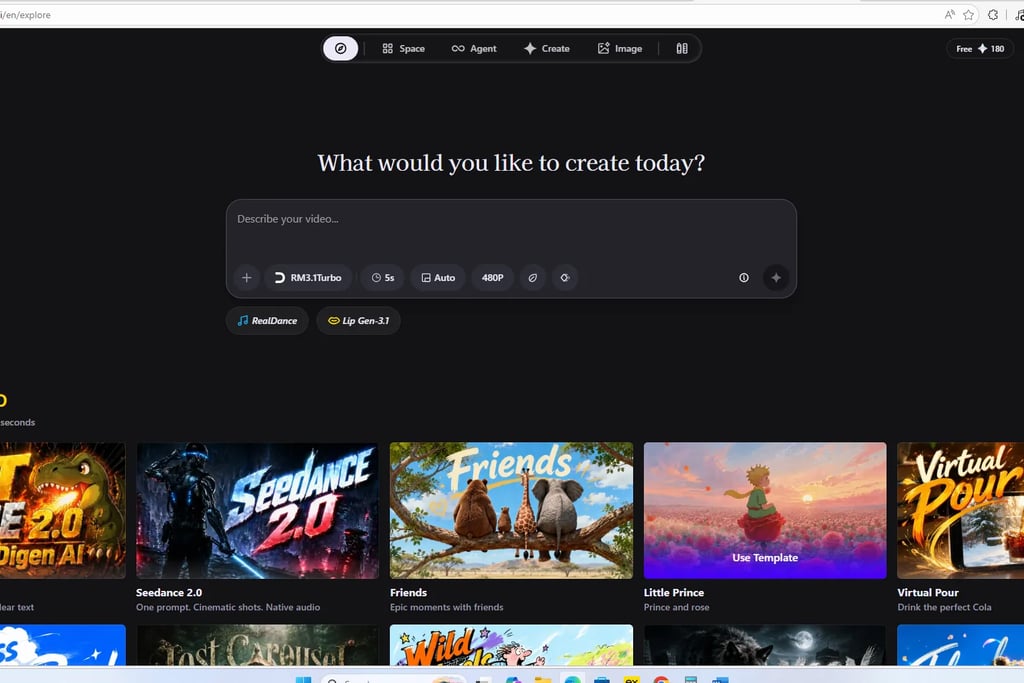
Digen AI’s dashboard immediately pushes users toward cinematic generation and rapid visual experimentation.
The First Thing I Noticed After Opening Digen AI
The platform does not feel like traditional video software.
It feels closer to:
Midjourney
Flux
image-generation ecosystems
except focused entirely on motion and cinematic atmosphere.
That difference matters because the workflow psychology changes completely.
Instead of:
editing timelines
technical rendering setups
layer management
production pipelines
the platform emphasizes:
prompts
visual ideas
atmosphere
speed
experimentation
And honestly, that may be the smartest thing Digen AI is doing right now.
Because the biggest shift happening in AI video is not realism.
It’s idea velocity.
Creators can suddenly test:
20 visual concepts
multiple cinematic moods
different emotional aesthetics
alternative scene directions
within a single hour.
That fundamentally changes creative workflows.
The Models Inside Digen AI Matter More Than Most Reviews Mention
One thing many reviews oversimplify is the actual model ecosystem.
Digen AI includes systems like:
RM3.1 Turbo
RealDance
Lip Gen 3.1
Seedance 2.0
And they behave very differently.
Some prioritize:
motion speed
stylized visuals
creator-friendly rendering
Others seem better at:
cinematic pacing
atmospheric movement
anime-style motion
facial animation
This matters because AI video generation is no longer “one model creates everything.”
The output quality changes dramatically depending on:
prompt structure
movement complexity
lighting
realism expectations
scene type
That’s one reason beginner users often get inconsistent results.
Testing Digen AI’s Text-to-Video Generation
This is where things became genuinely interesting.
I tested the platform across:
cyberpunk cinematics
anime environments
fantasy landscapes
emotional portrait scenes
urban realism
cinematic mood shots
dramatic lighting prompts
Some results looked shockingly good.
Others completely collapsed.
And honestly, that inconsistency still defines the entire AI video industry right now.
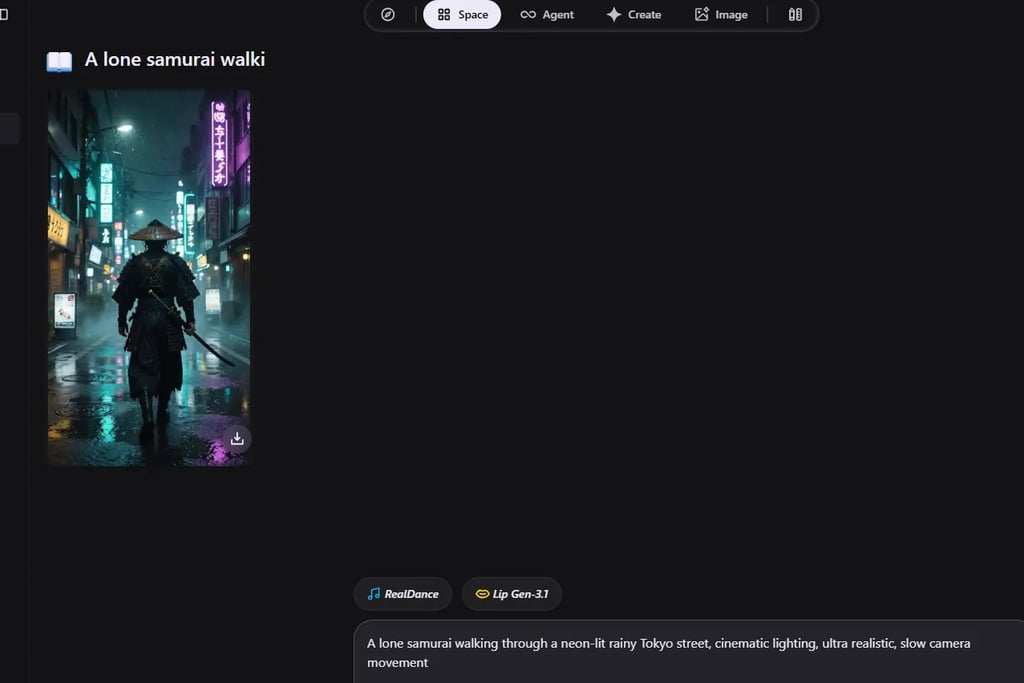
Testing Digen AI with a cinematic cyberpunk samurai prompt using RM3.1 Turbo and RealDance.
A Prompt That Worked Surprisingly Well
One of the strongest generations came from this prompt:
“A lone samurai walking through a neon-lit rainy Tokyo street, cinematic lighting, ultra realistic, slow camera movement.”
The reason this worked well is important.
The scene focused on:
atmosphere
lighting
pacing
cinematic mood
instead of trying to force:
complex action
multiple characters
chaotic movement
heavy interaction
That distinction matters massively in AI video generation.
Right now, AI performs best when generating:
emotional moments
cinematic environments
stylized atmosphere
visual storytelling snippets
rather than full narrative filmmaking.
Why the Samurai Scene Looked Better Than Expected
Several things stood out immediately.
1. The Lighting Was Surprisingly Cinematic
The neon reflections on wet streets looked far better than expected.
AI systems usually struggle with:
reflective surfaces
environmental depth
atmospheric consistency
But Digen AI handled the cyberpunk lighting well here.
2. Camera Movement Felt Natural Enough
This surprised me.
Older AI video systems often looked:
frozen
robotic
mechanically stiff
But the subtle movement here felt more cinematic than many early-generation AI tools.
Not perfect.
But usable.
And for short-form creator content, “usable” matters more than perfection.
3. Short Cinematic Shots Work Far Better Than Long Narrative Scenes
This became one of the clearest discoveries during testing.
Digen AI performs much better for:
short cinematic clips
visual mood shots
stylized social visuals
atmospheric edits
than:
long storytelling scenes
dialogue-heavy sequences
complex interactions
That’s important because many creators are evaluating the platform incorrectly.
They expect:
AI filmmaking.
But Digen AI currently works better as:
cinematic visual generation.
Those are very different things.
Image-to-Video Testing Was Surprisingly Strong
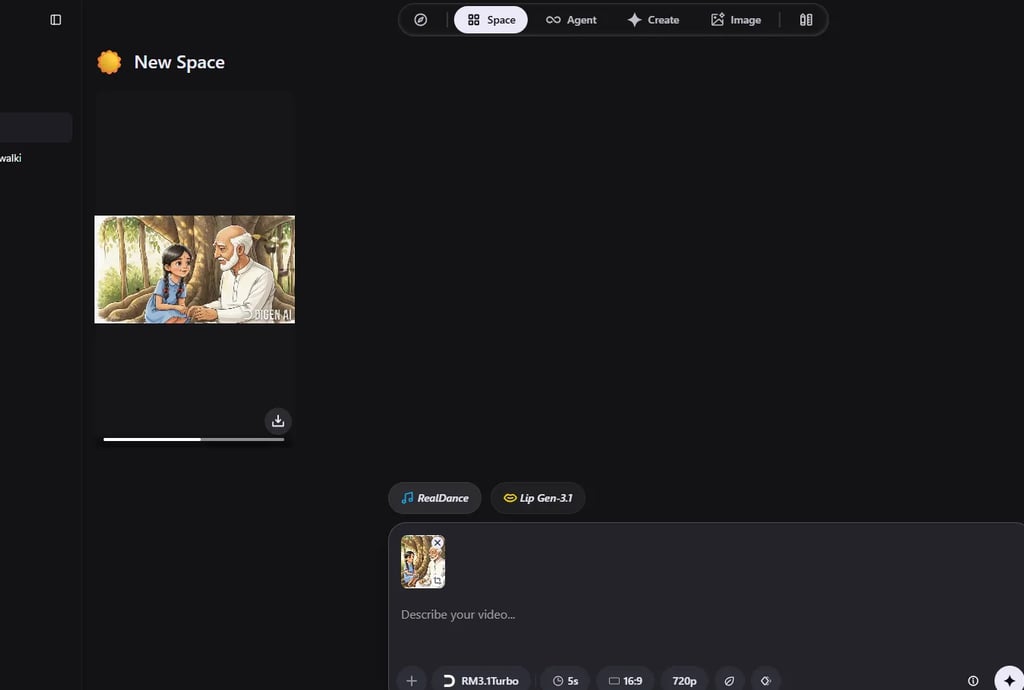
Honestly, this may currently be the platform’s strongest feature.
Animating still images produced:
more stable motion
better visual consistency
stronger atmosphere
cleaner cinematic results
than many raw text-to-video generations.
Testing Digen AI’s image-to-video workflow using uploaded cinematic artwork.
Why Image-to-Video Feels More Reliable Right Now
This is becoming a huge trend across AI creation ecosystems.
Fully AI-generated scenes still struggle with:
consistency
object permanence
facial stability
realistic movement
But image-to-video workflows reduce many of those problems.
The strongest workflow I tested looked like this:
Step 1
Generate a cinematic image first.
Step 2
Upload it into Digen AI.
Step 3
Animate using:
camera motion
subtle environmental movement
cinematic pacing
atmospheric effects
Step 4
Edit externally in:
CapCut
Premiere Pro
DaVinci Resolve
That workflow consistently produced stronger results.
This broader movement toward multimodal AI creation is also happening across other ecosystems discussed in this ChatGPT workflow analysis.
Where Digen AI Still Fails Badly
This section matters.
Because many AI reviews online still feel weirdly promotional.
But AI video generation still breaks constantly.
Digen AI included.
Facial Consistency Still Falls Apart
Longer scenes frequently suffer from:
face morphing
identity drift
inconsistent expressions
unstable details
Especially during:
camera rotation
emotional close-ups
fast motion
multi-character scenes
This remains one of the biggest unsolved problems in AI video.
Hands and Physics Still Expose the Illusion
AI realism improves dramatically every few months.
Hands still expose the illusion surprisingly fast.
Problems include:
distorted fingers
unnatural movement
clipping
strange object interaction
This becomes especially noticeable during:
dancing
combat scenes
object handling
emotional gestures
That’s why atmospheric scenes currently perform much better than complex realism.
A Failed Prompt That Completely Broke
One test generated a realistic woman walking through a crowded subway station.
The first two seconds looked impressive.
Then:
her face changed twice
her arm distorted unnaturally
background people melted together
movement became unstable
And honestly, this is the reality most AI video demos online avoid showing.
The best AI clips are usually:
short
carefully selected
heavily curated
That doesn’t mean the technology is bad.
But expectations still need to be realistic.
Digen AI vs Runway vs Kling vs Sora
PlatformBiggest StrengthBiggest WeaknessBest ForDigen AIFast experimentationInconsistent realismSocial creatorsRunwayEditing ecosystemExpensive scalingProfessional workflowsKlingRealistic motionSlower generationCinematic realismSoraScene intelligenceLimited accessAdvanced filmmaking
Digen AI feels significantly more creator-focused than enterprise-focused.
That changes the entire experience.
The platform prioritizes:
rapid experimentation
visual mood generation
creator momentum
fast rendering
short-form content workflows
rather than advanced production control.
Who Digen AI Is Actually For
The platform makes the most sense for:
TikTok creators
anime editors
AI reel creators
faceless YouTube channels
visual storytellers
Pinterest marketers
experimental creators
It makes far less sense for:
production studios
documentary filmmakers
commercial VFX pipelines
high-end cinematic production
That distinction explains why some people love the platform while others feel disappointed.
They expected completely different products.
The Bigger Shift Most People Still Don’t See
Most people think AI video is competing with filmmakers.
I don’t think that’s what’s happening.
AI video is competing with:
creative friction
execution speed
idea bottlenecks
production limitations
That changes the conversation entirely.
Digen AI dramatically lowers the barrier between:
“I imagined something”
and
“I can instantly visualize it.”
That may ultimately become more disruptive than realism itself.
Is Digen AI Worth Paying For?
For certain creators, absolutely.
Especially if you:
create short-form content regularly
experiment heavily with visuals
make cinematic AI edits
run faceless channels
prioritize speed over production precision
Probably not worth it if you expect:
flawless realism
Hollywood-quality filmmaking
advanced production control
stable long-form storytelling
Digen AI works best when treated like:
an AI cinematic sketchbook
a visual experimentation engine
a rapid creator workflow system
not a replacement for professional filmmaking pipelines.
Final Verdict
Digen AI is not the most technically advanced AI video system in 2026.
But I also think many people misunderstand what the platform is actually optimized for.
It is built around:
speed
experimentation
creator momentum
cinematic atmosphere
visual ideation
short-form engagement
And honestly, in those areas, it performs surprisingly well.
Its biggest strength is not realism.
It’s reducing the gap between:
“I have a cinematic idea”
and
“I can instantly turn it into motion.”
That distinction changes everything.
FAQs
Is Digen AI free to use?
Digen AI offers a limited free tier with generation credits, but most advanced features and longer video renders require paid usage. Free access is useful for testing the platform before committing to a subscription.
Is Digen AI good for YouTube Shorts and TikTok?
Yes. Digen AI is especially strong for:
cinematic short clips
anime edits
AI reels
mood-based visuals
faceless content
fast social media experimentation
The platform works far better for short-form creator content than long narrative filmmaking.
Can Digen AI create realistic videos?
Sometimes.
The platform performs surprisingly well for:
atmospheric scenes
cinematic lighting
cyberpunk visuals
stylized environments
emotional visual storytelling
But realism still breaks during:
fast movement
hand interaction
facial consistency
multi-character scenes
complex motion physics
Is Digen AI better than Runway?
They target different types of creators.
Digen AI focuses more on:
rapid experimentation
fast cinematic generation
creator accessibility
social-ready visuals
Runway is stronger for:
professional workflows
editing features
advanced production control
structured creative pipelines
What is Digen AI best used for?
Digen AI works best for:
AI cinematic clips
image-to-video animation
TikTok visuals
anime-style motion
faceless YouTube content
cinematic mood shots
AI-generated social content
It performs much better as a rapid visual experimentation platform than a full filmmaking replacement.
Does Digen AI work better with text-to-video or image-to-video?
From testing, image-to-video often produced more stable and visually consistent results.
A strong workflow currently is:
Generate a cinematic image
Upload it into Digen AI
Animate it using subtle movement and camera motion
Edit externally in CapCut or Premiere Pro
This workflow usually creates cleaner results than relying entirely on raw text-to-video generation.
What are the biggest weaknesses of Digen AI?
The biggest issues currently include:
facial morphing
unstable hands
inconsistent motion
broken physics
prompt unpredictability
identity drift in longer scenes
These problems still affect almost every AI video generator in 2026.
Who should avoid Digen AI?
Digen AI may not be ideal for:
professional film studios
documentary production
advanced VFX pipelines
users expecting perfect realism
creators needing long-form narrative consistency
The platform works best for rapid experimentation rather than production-grade filmmaking.
Which prompts work best in Digen AI?
The strongest prompts usually focus on:
atmosphere
lighting
emotion
cinematic framing
stylized environments
Examples:
cyberpunk streets
fantasy landscapes
anime cinematic scenes
emotional portraits
neon rainy environments
Short cinematic moments generally perform much better than highly complex action scenes.
Is Digen AI worth paying for in 2026?
For creators making:
AI edits
short-form videos
cinematic reels
visual storytelling content
Yes, it can absolutely be worth it.
Especially if speed and experimentation matter more to you than flawless realism.
But creators expecting Hollywood-quality AI filmmaking will probably feel disappointed with the current limitations.