How Gemini AI Can Help in Daily Life (2026 Guide): Real Ways to Save Time, Stay Organized, and Get More Done
Discover practical ways Gemini AI helps with daily tasks, emails, reminders, travel, study, meals, and productivity in 2026.
DIPJYOTI SHARMA
5/12/20268 min read
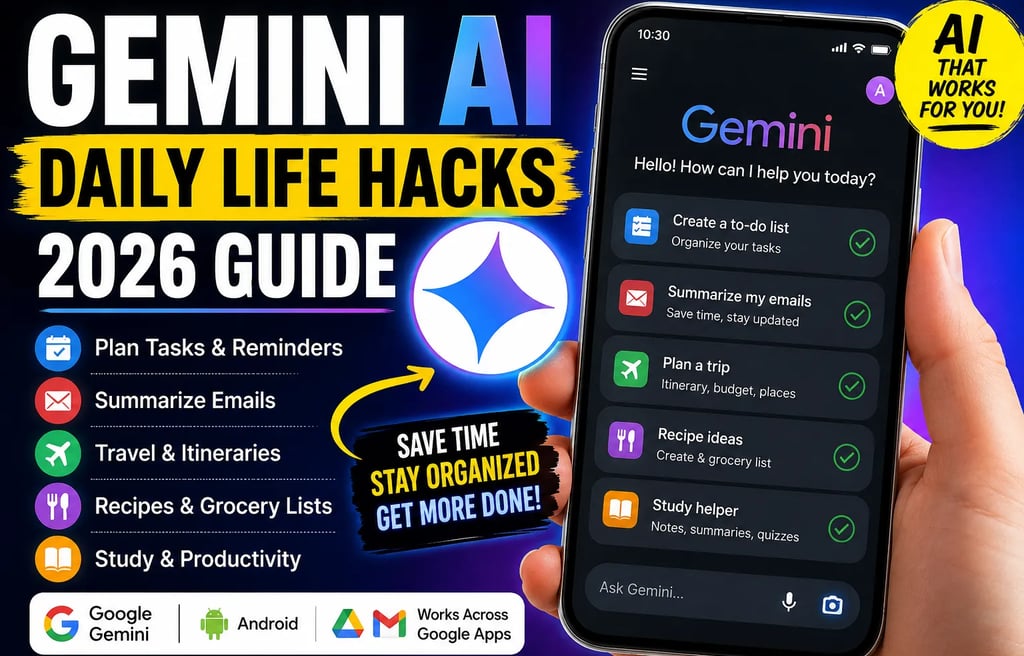
How Gemini AI Can Help Us in Day-to-Day Life
Artificial intelligence stopped being a “future technology” the moment it quietly entered our calendars, inboxes, grocery lists, and phones.
What surprised me most while testing Google Gemini over several weeks wasn’t its ability to answer questions. Plenty of AI tools already do that. The real shift came from using Gemini AI daily tasks in ordinary moments — scheduling reminders while cooking, summarizing long emails before meetings, planning travel itineraries, and even organizing random thoughts into actionable to-do lists.
That’s where Google Gemini starts becoming less like a chatbot and more like a practical personal assistant.
For beginners, the biggest challenge isn’t “What is Gemini AI?”
It’s:
What can it actually do in real life?
Is it useful beyond simple prompts?
Can it genuinely save time?
What tasks should people trust it with — and what should they avoid?
After extensive hands-on testing across Android, Gmail, Docs, and Google Workspace tools, here’s the practical reality of how Gemini AI productivity workflows fit into everyday life in 2026.
What Is Google Gemini AI?
Google developed Gemini as a multimodal AI assistant capable of understanding text, images, voice, PDFs, screenshots, videos, and contextual user interactions across Google’s ecosystem.
Unlike older assistants that mainly handled commands, Gemini tries to understand intent.
That changes the experience dramatically.
Instead of saying:
“Set alarm 7 PM.”
People now naturally type:
“Remind me to call the landlord after dinner and also send the electricity bill tomorrow morning.”
Gemini understands context surprisingly well most of the time.
The strongest advantage of Google Gemini personal assistant features comes from integration with:
Gmail
Google Docs
Google Calendar
Android
Google Maps
YouTube
Google Drive
That ecosystem connection is what makes it genuinely useful for daily life.
Why Gemini AI Feels Different From Traditional AI Chatbots
Most AI assistants still behave like tools you actively open.
Gemini increasingly behaves like ambient assistance.
During testing, I noticed three practical differences:
This matters because most users don’t want “AI conversations.”
They want fewer mental tabs open.
Gemini AI Daily Tasks That Actually Save Time
1. Smart Reminders That Feel Human
One underrated Gemini AI reminders feature is contextual scheduling.
Instead of rigid commands, you can type naturally:
“Remind me to drink water every two hours.”
“Remind me to pay rent on the 3rd.”
“Set medication reminders with Gemini every night at 9.”
“Tell me to call mom after office hours.”
For beginners, this removes friction completely.
Real-World Observation
During testing, Gemini handled recurring reminders better than expected, especially when mixed with vague timing phrases like:
“later tonight”
“next Friday morning”
“after lunch”
It still occasionally misunderstands complex chained requests, but it’s improving rapidly.
How to Schedule Tasks With Gemini AI
One of the easiest productivity workflows is task scheduling.
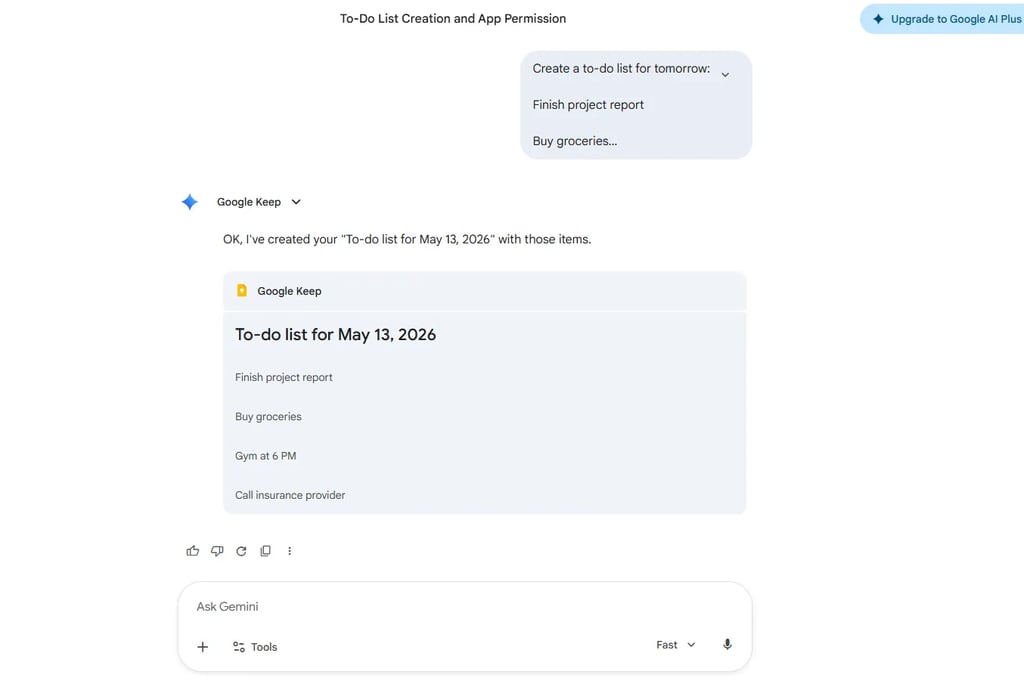
Example Workflow
Prompt:
“Create a to-do list with Google Gemini for tomorrow:
Finish project report
Buy groceries
Gym at 6 PM
Call insurance provider”
Gemini can:
create reminders
suggest time blocks
organize tasks by urgency
sync with Google Calendar
For busy users, this becomes surprisingly addictive because it reduces cognitive load.
Gemini AI Email Summarizer: A Huge Time Saver
Email overload is where Gemini AI daily life help becomes genuinely practical.
The Gemini AI email summarizer feature can:
summarize long email threads
extract deadlines
identify action items
draft responses
prioritize urgent messages
Example Use Case
I tested Gemini on a 27-message project thread.
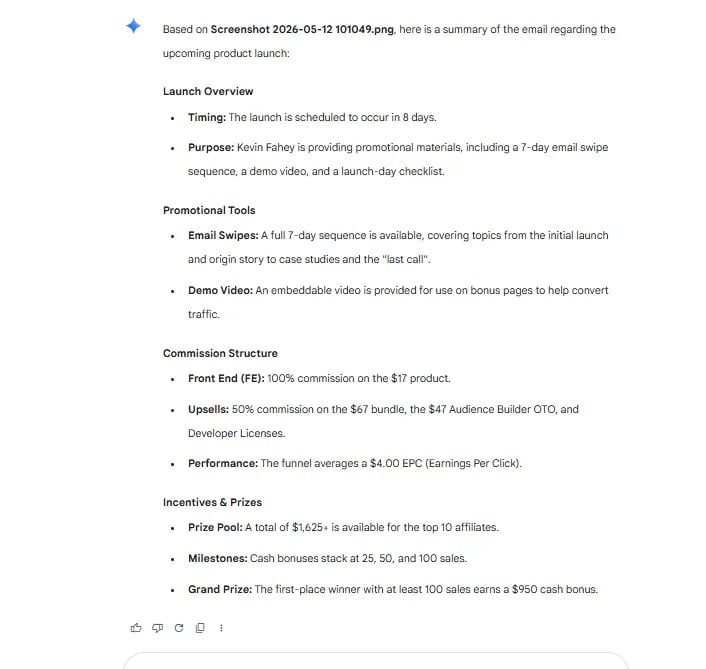
Instead of reading everything manually, Gemini summarized:
key decisions
pending tasks
who needed responses
deadlines mentioned across emails
The summary wasn’t perfect, but it reduced reading time dramatically.
That’s the kind of usefulness that turns AI from novelty into habit.
Gemini AI Smart Replies Are Better Than Most People Expect
Most “smart reply” systems feel robotic.
Gemini’s responses are noticeably more context-aware.
It adapts tone surprisingly well:
professional
friendly
concise
apologetic
formal
Example Prompt
“Draft a professional follow-up email after an interview.”
Gemini typically produces cleaner first drafts than older AI assistants.
Still, users should always review responses manually before sending important emails.
AI occasionally invents confidence where nuance is needed.
Gemini AI Calendar Management for Busy People
Calendar management is where Google Gemini personal assistant features start feeling practical instead of experimental.
Gemini AI calendar management can help:
organize meetings
suggest schedule gaps
prevent overlaps
create recurring events
optimize routines
Gemini AI Morning Routine Automation
One workflow I found genuinely useful:
Prompt:
“Create a balanced weekday morning routine from 6 AM to 8 AM.”
Gemini generated:
hydration reminder
exercise block
breakfast prep
email check timing
focus-work preparation
It even suggested buffer periods between tasks — something many productivity apps ignore.
Gemini AI Travel Planning Is Surprisingly Good
Travel planning combines multiple messy tasks:
researching destinations
budgeting
scheduling
mapping routes
hotel comparisons
restaurant ideas
Gemini AI travel planning handles these surprisingly well for casual travelers.
Example Prompt
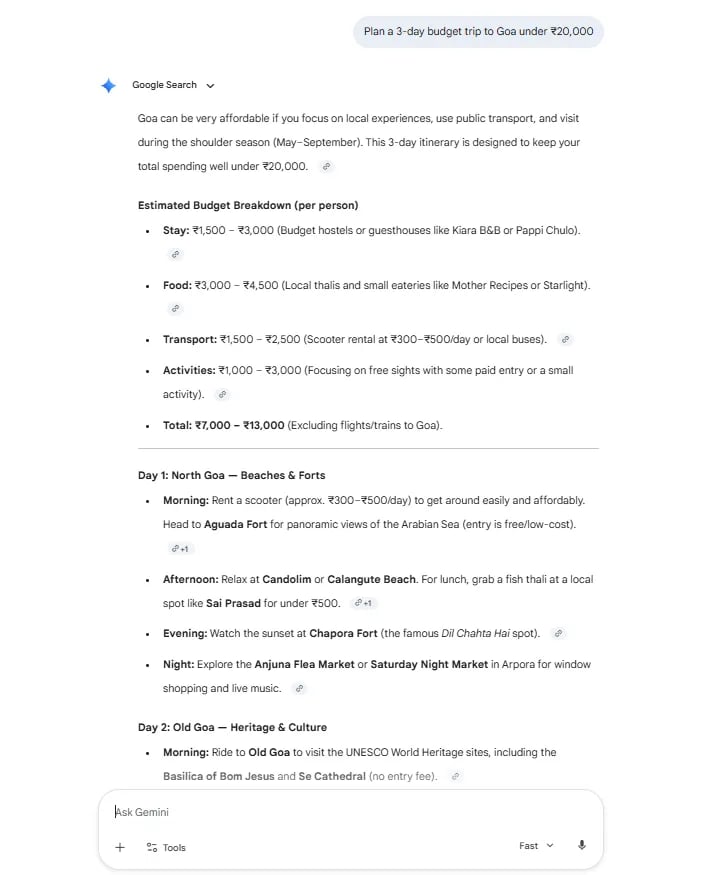
“Plan a 3-day budget trip to Goa under ₹20,000.”
Gemini can generate:
estimated expenses
transport suggestions
sightseeing plans
weather considerations
meal ideas
time-efficient itineraries
The biggest strength isn’t accuracy alone.
It’s speed.
What normally takes 40 tabs and two hours becomes a structured draft in minutes.
Gemini AI Recipe Suggestions and Meal Planning
This is one of the most underrated use cases.
Gemini AI Grocery List From Recipe
You can say:
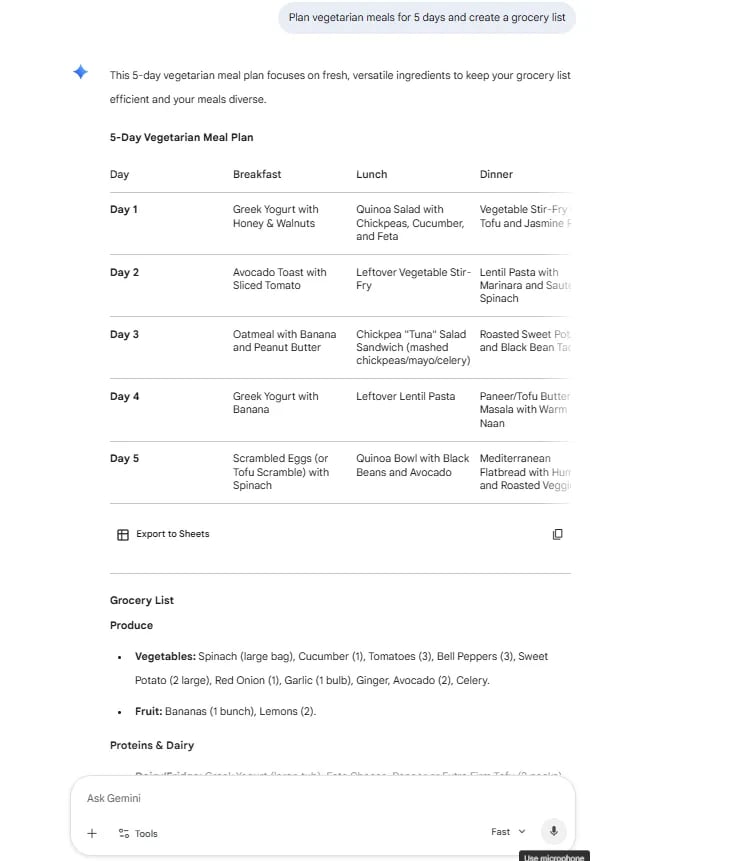
“Plan weekly meals with Gemini AI for vegetarian dinners.”
Then ask:
“Create a grocery list from those recipes.”
Gemini automatically organizes ingredients logically.
What Worked Well
During testing:
ingredient grouping was good
meal variety was decent
dietary adjustments worked well
Weaknesses
The nutrition estimates occasionally felt inconsistent.
For medical diets, users should still verify information independently.
Gemini AI Study Helper for Students
Students may benefit more from Gemini than almost any other group.
Gemini AI Study Helper Can:
summarize chapters
explain difficult concepts
create flashcards
generate quizzes
simplify technical language
translate documents using Gemini AI
Practical Observation
Gemini performs especially well when students upload:
screenshots
PDFs
lecture notes
diagrams
Its document analysis capability is noticeably stronger than many earlier AI assistants.
Gemini AI Document Analysis Feels Like a Real Productivity Tool
One genuinely impressive feature is Gemini AI document analysis.
Users can upload:
PDFs
spreadsheets
contracts
research documents
reports
Gemini can then:
summarize content
explain confusing sections
extract data
compare documents
identify action items
Gemini AI Explain Medical Reports
This feature deserves caution.
Gemini can simplify medical terminology surprisingly well, but it should never replace doctors.
It works best for:
understanding terminology
clarifying reports
preparing questions for physicians
Not for diagnosis.
That distinction matters.
Gemini AI Daily Life Help Beyond Productivity
This is where things get interesting.
Many smaller use cases don’t appear in marketing materials but become useful in practice.
Gemini AI Bill Splitting Calculator
You can upload restaurant bills and ask Gemini to divide expenses by person.
Useful for:
trips
roommates
shared dinners
Gemini AI Expense Voice Logging
Voice-based expense tracking works surprisingly well:
“Spent ₹450 on groceries and ₹120 on parking.”
Gemini can organize entries into categories.
Gemini AI Parking Spot Reminder
One practical trick:
Take a photo of your parking location and ask Gemini to remember it.
Helpful in:
malls
airports
crowded parking structures
Gemini AI Birthday Gift Suggester
Gemini performs better when prompts include personality details.
Example:
“Suggest birthday gifts for a 28-year-old photographer who likes hiking.”
Results become significantly more personalized.
Gemini AI Wardrobe Weather Advisor
By combining weather forecasts and wardrobe preferences, Gemini can suggest clothing combinations.
Not essential.
But surprisingly convenient during travel.
Gemini AI Plant Watering Tracker
For beginners with indoor plants, Gemini can create watering schedules based on:
plant type
climate
season
sunlight exposure
Small use cases like this are what make AI feel integrated into ordinary life.
Gemini AI Fitness Log From Photos
This feature still feels experimental, but it has potential.
Users can upload:
meal photos
gym screenshots
progress images
Gemini attempts to estimate:
calories
workout summaries
nutrition observations
Accuracy varies heavily.
For serious fitness tracking, dedicated apps remain better.
Gemini AI Summarize Long YouTube Videos
This feature can save massive amounts of time.
Instead of watching a 45-minute tutorial, users can ask:
“Summarize this video into key points.”
Gemini works especially well for:
educational videos
podcasts
interviews
tech explainers
The summaries are usually concise enough for quick learning.
Gemini AI Draft Professional Emails Faster
Professionals increasingly use Gemini for:
client communication
meeting follow-ups
proposal drafts
negotiation replies
support responses
Where It Works Best
Gemini is strongest when:
tone matters
speed matters
structure matters
Where It Struggles
It sometimes sounds overly polished.
Human editing still matters for authenticity.
Strengths and Weaknesses of Gemini AI in Daily Life
What Gemini Does Well
Strengths
Strong Google ecosystem integration
Excellent contextual understanding
Fast summarization
Good document analysis
Useful scheduling features
Natural language prompts
Beginner-friendly
Where Gemini Still Falls Short
Weaknesses
Occasional hallucinations
Internet-dependent workflows
Some responses feel repetitive
Complex automations can fail
Privacy concerns remain valid
Not ideal for sensitive medical/legal advice
The best approach is treating Gemini as:
an intelligent assistant — not an unquestionable authority.
Gemini AI vs Other AI Assistants
Users focused heavily on Google apps may prefer Gemini.
Users wanting deep creative workflows may still prefer ChatGPT.
Research-heavy users often lean toward Perplexity.
Who Should Use Gemini AI?
Best For
Students
Busy professionals
Android users
Gmail-heavy workflows
Beginners exploring AI
Productivity-focused users
Probably Not Ideal For
Users deeply concerned about AI privacy
Advanced automation enthusiasts
Offline-first workflows
People expecting perfect accuracy
Practical Tips to Use Gemini AI More Effectively
1. Use Specific Prompts
Bad:
“Help me study.”
Better:
“Explain photosynthesis in simple language with examples for class 10.”
2. Give Context
The more context Gemini receives, the better the output becomes.
3. Use Follow-Up Questions
Gemini improves dramatically in conversational workflows.
4. Verify Important Information
Especially for:
health
finance
legal matters
The Bigger Shift Happening With AI Assistants
The interesting part isn’t that Gemini can answer questions.
It’s that people are slowly outsourcing mental clutter.
Daily planning.
Remembering tasks.
Organizing information.
Summarizing noise.
That’s the real transformation.
AI assistants are becoming cognitive support systems.
Not replacements for human thinking — but filters for digital overload.
And in practical day-to-day life, that’s often more valuable than flashy AI demos.
Final Thoughts
Gemini AI daily life help is most valuable in small repeated moments.
Not dramatic moments.
The email summaries.
The reminders.
The travel drafts.
The grocery planning.
The calendar organization.
Those tiny time savings compound quickly.
For beginners entering the AI ecosystem in 2026, Gemini feels less intimidating than many competitors because it integrates naturally into tools people already use every day.
It isn’t flawless.
But it’s becoming increasingly useful in ways that quietly improve productivity without demanding technical expertise.
That’s why Google Gemini personal assistant workflows are gaining traction far beyond tech enthusiasts.
The people benefiting most are often ordinary users simply trying to reduce friction in everyday life.
FAQs
Can Gemini AI schedule tasks automatically?
Yes. Gemini can create reminders, recurring schedules, calendar events, and task lists using natural language prompts.
Is Gemini AI free to use?
Google offers both free and premium Gemini plans depending on features, integrations, and usage limits.
Can Gemini AI summarize emails?
Yes. Gemini AI email summarizer tools can condense long conversations, extract action points, and draft replies.
Can Gemini AI help students study?
Yes. Gemini can explain concepts, summarize notes, generate quizzes, and analyze uploaded documents.
Is Gemini AI safe for medical advice?
Gemini can explain terminology but should not replace professional medical guidance or diagnosis.
Can Gemini AI create grocery lists?
Yes. Gemini AI grocery list from recipe workflows work well for meal planning and shopping organization.
Does Gemini AI work better on Android?
Generally yes, because Gemini integrates deeply with Android and Google services.
You May Like to Read