Gmail AI Upgrade 2026: Features, Benefits & How to Use (Full Guide)
Discover Gmail AI Upgrade 2026 features, including email summaries, smart replies, and automation. Learn how to use AI for faster email management.
AI TOOLS
DIPJYOTI SHARMA
4/9/20266 min read
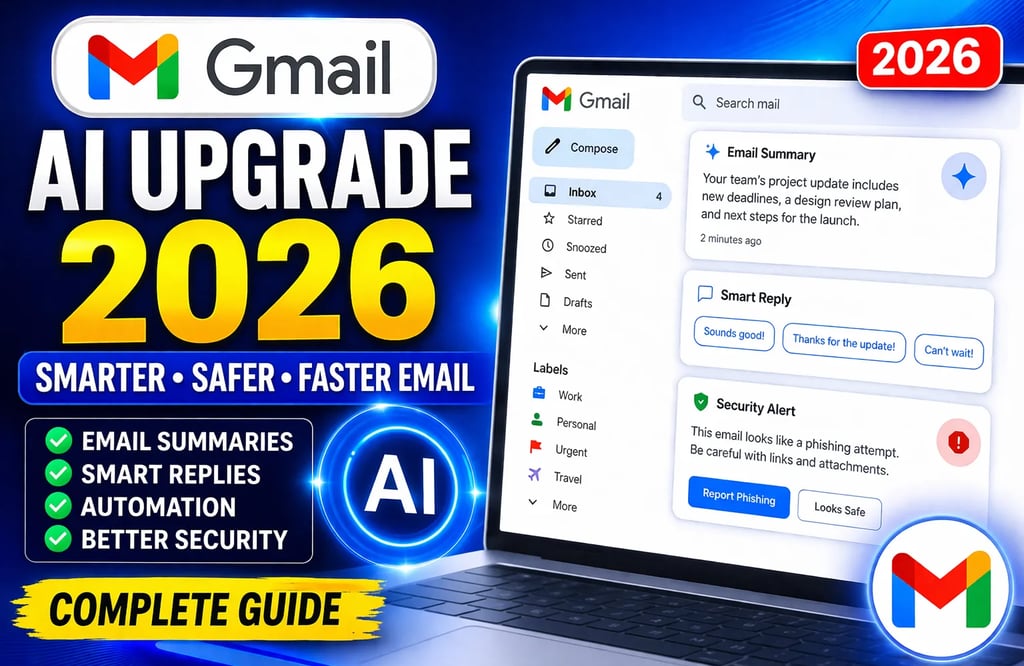
Gmail AI Upgrade 2026: The Ultimate Guide to Smarter, Safer, and Faster Email
Are you wondering what the Gmail AI Upgrade 2026 brings to your inbox? You’re not alone. In 2026, Google has supercharged Gmail with cutting-edge artificial intelligence, making it the most powerful and intuitive email platform yet. Whether you’re a professional handling hundreds of emails a day or a casual user seeking efficiency, this comprehensive guide covers everything you need to know about Gmail’s latest AI features, how they work, and how to leverage them for maximum productivity and security.
Jump to a section:
What’s New in Gmail AI 2026?
Top Gmail AI Features Explained
How Gmail AI is Revolutionizing Email Management
Step-by-Step: Using Gmail’s AI Tools
Benefits for Individuals and Businesses
Gmail AI vs Competitors: Outlook, Yahoo, ProtonMail
Privacy, Security, and Ethical AI in Gmail
Best Practices and Pro Tips
Gmail AI Pricing and Availability
FAQs: Everything You Need to Know
Conclusion: Should You Upgrade?
What’s New in Gmail AI 2026?
Google’s Gmail AI Upgrade for 2026 isn’t just an update—it’s a transformation. Leveraging the latest advancements in generative AI and machine learning, Gmail now delivers:
AI-powered email summarization
Context-aware Smart Reply 2.0
Advanced phishing and spam detection
Intelligent auto-organization and priority sorting
Duet AI for collaborative email drafting
Real-time translation and tone adjustment
Voice-to-email and email-to-task automation
These features are designed to save you time, boost productivity, and keep your inbox secure.
Top Gmail AI Features Explained
1. AI-Powered Email Summarization
Gmail now uses advanced AI to generate concise summaries of long or complex emails. With a single click, you can grasp the key points without reading the entire thread—perfect for newsletters, lengthy threads, or urgent business updates.
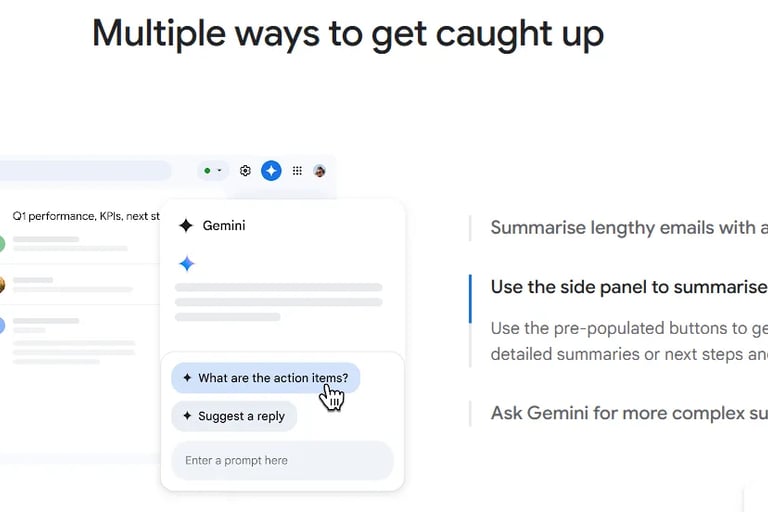
Here’s an example of Gmail AI (Gemini) summarizing emails and suggesting actions:
Gmail AI (Gemini) summarizes emails and suggests replies and action items in real time.
2. Smart Reply 2.0 with Contextual Understanding
Gone are the days of robotic, irrelevant auto-replies. Smart Reply 2.0 understands the context, tone, and intent of emails, offering personalized, natural-sounding responses and even full email drafts based on your conversation history.
3. Next-Gen Phishing and Spam Detection
Powered by Gemini models, Gmail’s security AI identifies sophisticated phishing attempts and malicious attachments with industry-leading accuracy, protecting you from scams and cyber threats in real time.
4. Auto-Organization & Smart Priority Sorting
Gmail’s AI automatically categorizes incoming emails into Primary, Urgent, Promotions, Social, and Updates. It learns your preferences and surfaces the most important emails at the top, helping you stay on top of what matters.
5. Duet AI for Team Collaboration
Just like in Google Docs, Duet AI now enables real-time collaboration in Gmail. Multiple users can draft, edit, and comment on emails together, making it easier than ever to coordinate team communications and assign action items directly from your inbox.
6. Real-Time Translation and Tone Adjustment
Gmail can instantly translate emails into your preferred language and detect the sender’s tone (formal, casual, urgent). You can also adjust the tone of your outgoing emails to match your audience, from professional to friendly.
7. Voice-to-Email & Automation
Use your voice to compose emails via Gemini-powered dictation. Gmail can also convert emails into actionable tasks in Google Calendar or Tasks, streamlining your workflow.
How Gmail AI is Revolutionizing Email Management
The Gmail AI upgrade 2026 isn’t just about flashy new tools—it fundamentally changes how you interact with your inbox:
Save Time: Instantly summarize, sort, and respond to emails.
Reduce Overload: Let AI handle categorization and prioritize what’s urgent.
Improve Communication: Real-time translation and tone adjustment break down language and cultural barriers.
Enhance Security: Proactive AI defense keeps you safe from evolving cyber threats.
Boost Collaboration: Duet AI bridges the gap between email and project management.
For businesses, these upgrades translate to faster decision-making, reduced risk, and improved team productivity.
Step-by-Step: Using Gmail’s AI Tools
1. Enable Experimental AI Features
Open Gmail and click the gear icon (Settings)
Go to “See all settings” > “Advanced”
Turn on “Experimental AI features”
2. Use AI Summarization
Open a long email or thread
Click the “Summary” button at the top to see a concise overview
3. Try Smart Reply 2.0
Start composing a reply
Gmail will suggest context-aware replies and can expand them into full drafts with a click
4. Auto-Organization
Use the sidebar to switch between categories (Primary, Urgent, Promotions, etc.)
Pin or mute conversations for better inbox management
5. Collaborate with Duet AI
Click “Add people” when composing an email to invite collaborators
Edit together in real time and assign tasks directly from the email
6. Real-Time Translation
Open an email in another language
Click the translate icon to convert it to your preferred language and reply in your own
7. Use Voice Dictation
In the compose window, click the microphone icon
Speak your message; Gmail will transcribe and suggest improvements
Benefits for Individuals and Businesses
For Individuals
Faster, smarter email management
Less time spent sorting and reading
Improved communication with real-time translation
Stronger protection against scams and phishing
For Businesses
Streamlined team workflows
Enhanced security for sensitive data
Global collaboration made easy
Reduced risk of missed communications or deadlines
Integrating these AI features with Google Workspace unlocks even more productivity gains.
Gmail AI vs Competitors: Outlook, Yahoo, ProtonMail
Gmail AI vs. Outlook AI
Gmail: Superior AI for summarization, translation, and collaborative drafting.
Outlook: Strong for calendar integration and meeting scheduling, but Gmail’s AI is more advanced for email productivity and real-time translation.
Gmail AI vs. Yahoo Mail AI
Gmail: More robust AI features, especially for security and business use.
Yahoo: Basic AI for sorting and replies, but lacks advanced business and security tools.
Gmail AI vs. ProtonMail
Gmail: More powerful AI for productivity and automation.
ProtonMail: Best for privacy-focused users, but with limited AI features compared to Gmail.
Privacy, Security, and Ethical AI in Gmail
With great AI power comes responsibility. Google ensures that:
Emails are processed securely, with end-to-end encryption where possible
User data is not used to train public models by default
Real-time phishing detection is performed without compromising privacy
However, always review your privacy settings and use two-factor authentication for maximum security. For highly sensitive communications, consider supplementing Gmail with encrypted platforms like ProtonMail.
Best Practices and Pro Tips for Gmail AI
Train the AI: The more you use Gmail’s AI tools, the smarter they get.
Give Feedback: Use the thumbs up/down on AI suggestions to improve accuracy.
Customize Tone Settings: Adjust the tone of AI-generated replies to fit your style.
Leverage Shortcuts: Master Gmail keyboard shortcuts for lightning-fast navigation.
Review Security Alerts: Don’t ignore AI-detected phishing or suspicious activity.
Use Labels and Filters: Combine with AI auto-sorting for a zero-inbox strategy.
Gmail AI Pricing and Availability
Most core Gmail AI features are available for free to all Gmail users. However, advanced features like Duet AI collaboration and enterprise-grade security require a Google Workspace subscription (Business or Enterprise plans).
Free Gmail: Access to AI summarization, Smart Reply, translation, and basic security features
Google Workspace: Full access to all AI features, including Duet AI and enhanced admin controls
Check your plan in the Google Workspace admin console.
FAQs: Everything You Need to Know
How do I enable Gmail’s new AI features?
Go to Gmail Settings > See all settings > Advanced, and enable “Experimental AI features.”Are Gmail AI features available on mobile?
Yes, most features are available on Gmail’s Android and iOS apps.Can I turn off AI features if I don’t want them?
Yes, you can disable “Experimental AI features” in the settings menu.Is my data safe with Gmail AI?
Google uses strong encryption and states that emails are not used to train public models by default.Does Gmail AI support all languages?
Most features support a wide range of languages, but coverage may vary by region.Are there limits on how many emails Gmail AI can summarize?
No explicit daily limits are set, but extremely high usage may cause minor delays.Can I customize the tone of AI-generated replies?
Yes, you can select the tone (formal, casual, concise) before sending.Does Gmail AI work with emails from other providers?
Core features work best with Gmail accounts, but you can forward emails from other providers to use AI tools.How often are Gmail AI features updated?
Google releases incremental updates throughout the year, with major launches in spring and fall.How can I provide feedback on AI suggestions?
Use the “thumbs up” or “thumbs down” buttons that appear after AI-generated suggestions.
Conclusion: Should You Upgrade?
Absolutely. The Gmail AI Upgrade 2026 is a game-changer for anyone who wants a smarter, safer, and more efficient inbox. With advanced AI features that save time, enhance security, and support global collaboration, Gmail remains the top choice for individuals and businesses alike.
Ready to unlock the power of AI in your inbox? Log in to Gmail and experience the future of email today!
Related Resources