MagicSchool AI Review 2026: Best AI Tool for Teachers and Lesson Planning
Discover how MagicSchool AI helps teachers create lesson plans, quizzes, AI tutoring, and classroom activities faster in 2026. Full review with screenshots, features, pros, and real use cases.
AI TOOLS
DIPJYOTI SHARMA
5/19/20264 min read
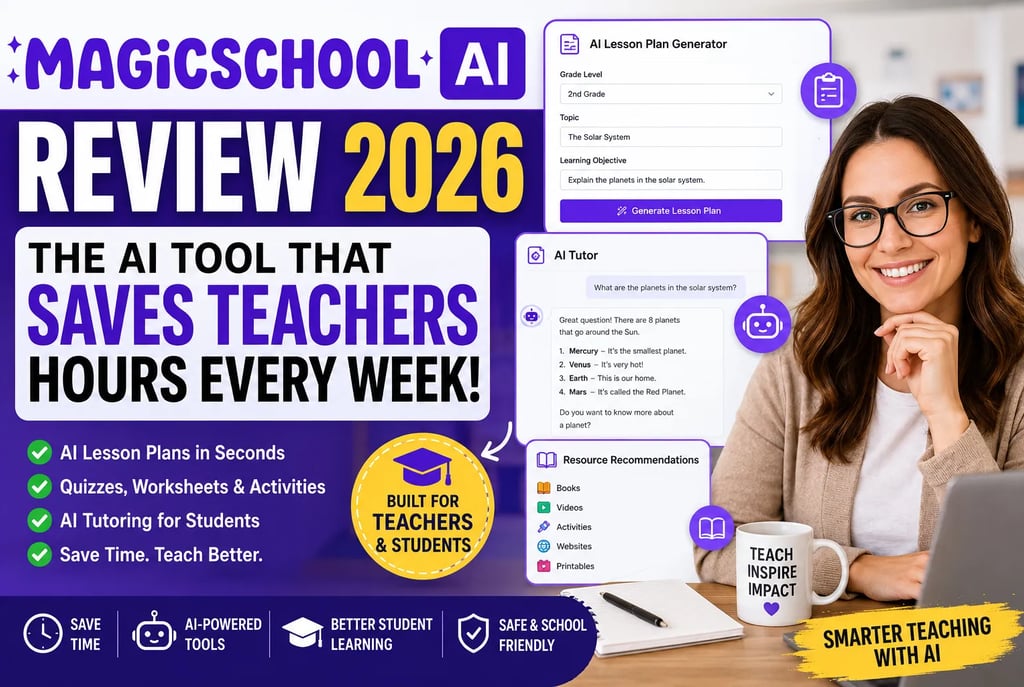
MagicSchool AI Review 2026: The AI Tool That Could Save Teachers Hours Every Week
What if teachers could create lesson plans, quizzes, classroom activities, and student feedback in just a few minutes instead of spending hours doing repetitive work?
That’s exactly why MagicSchool AI is becoming one of the fastest-growing AI tools in education.
Many teachers are already using AI to:
save time
reduce classroom workload
create better learning materials
help students learn faster
But most AI chatbots are not designed for classrooms.
MagicSchool AI is different.
It is built specifically for:
teachers
schools
students
classroom workflows
If you enjoy exploring practical AI tools, you may also like our guide on underrated AI business platforms:
7 Underrated AI Tools That Can Transform Your Business in 2026
In this review, we’ll explore:
what MagicSchool AI is
its best features
real classroom examples
AI tutoring tools
lesson planning workflows
pros and cons
whether it’s actually worth using
What is MagicSchool AI?
MagicSchool AI is an education-focused AI platform designed to help teachers save time and improve classroom productivity.
Instead of using a general AI chatbot for everything, teachers can use MagicSchool AI for classroom-specific tasks like:
lesson planning
quiz generation
worksheets
grading help
student feedback
AI tutoring
classroom activities
The platform combines many education tools into one simple dashboard.
If you are interested in how AI is changing productivity workflows, check out:
How AI Automation Is Changing Everyday Workflows in 2026
Why MagicSchool AI Is Becoming So Popular
Teachers spend a huge amount of time doing repetitive work every week.
Things like:
creating lesson plans
preparing quizzes
writing student feedback
building worksheets
organizing classroom activities
can take hours.
MagicSchool AI helps automate much of this work.
That means teachers can spend more time:
teaching students
improving lessons
helping classrooms
instead of constantly preparing materials.
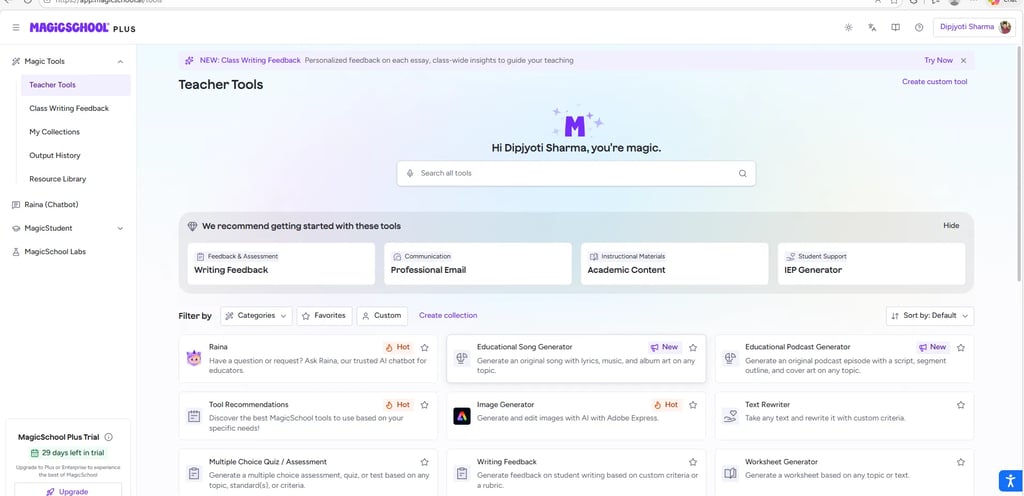
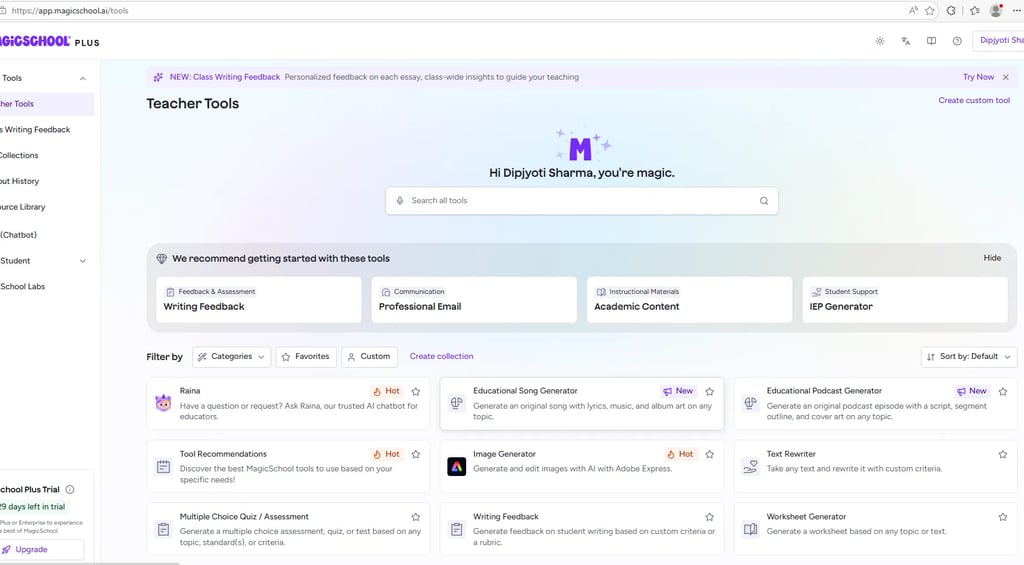
MagicSchool AI Dashboard
One thing I liked immediately was how simple the dashboard feels.
Even beginners can understand it quickly.
The platform includes tools for:
lesson planning
quizzes
worksheets
AI tutoring
classroom feedback
educational resources
all inside one dashboard.
AI Lesson Plan Generator
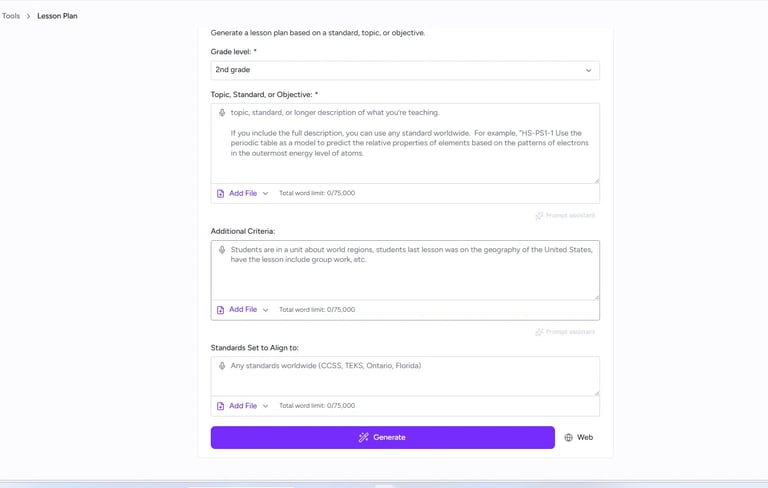
One of the best features inside MagicSchool AI is the lesson plan generator.
Teachers simply enter:
grade level
topic
learning objective
classroom requirements
and the AI creates a structured lesson plan automatically.
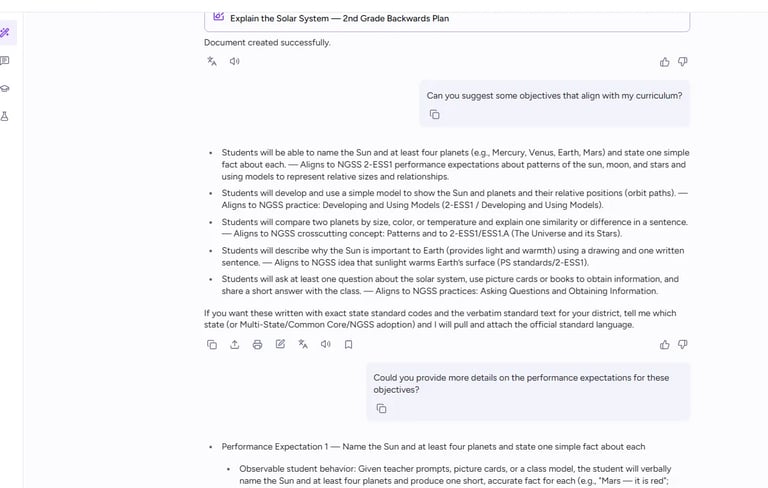
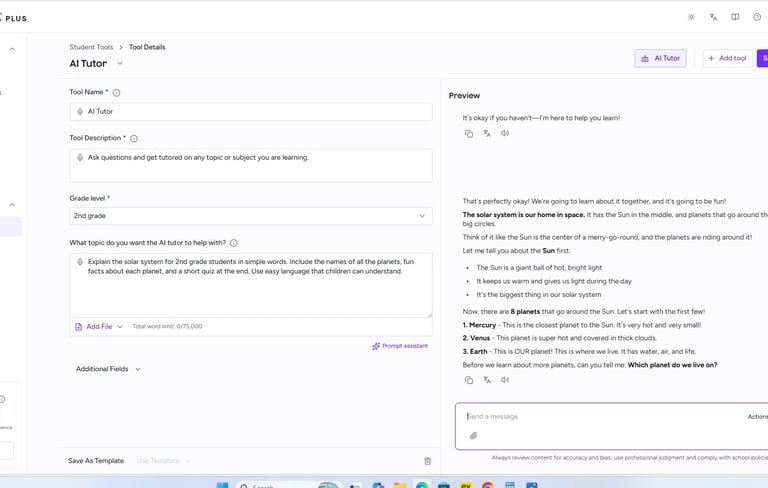
I tested this feature using a simple topic about the solar system for 2nd grade students.
The setup process was surprisingly easy.
If you like AI tools that simplify content creation, you may also enjoy:
Gamma AI Review 2026: AI Presentation Creation Made Easy
AI-Generated Lesson Plans in Seconds
After entering the lesson details, MagicSchool AI generated:
learning objectives
classroom activities
discussion questions
teaching ideas
quiz suggestions
within seconds.
This is one of the most practical features for busy teachers.
Instead of starting from a blank page, teachers can quickly create a strong lesson structure and customize it later.
That alone can save a lot of time every week.
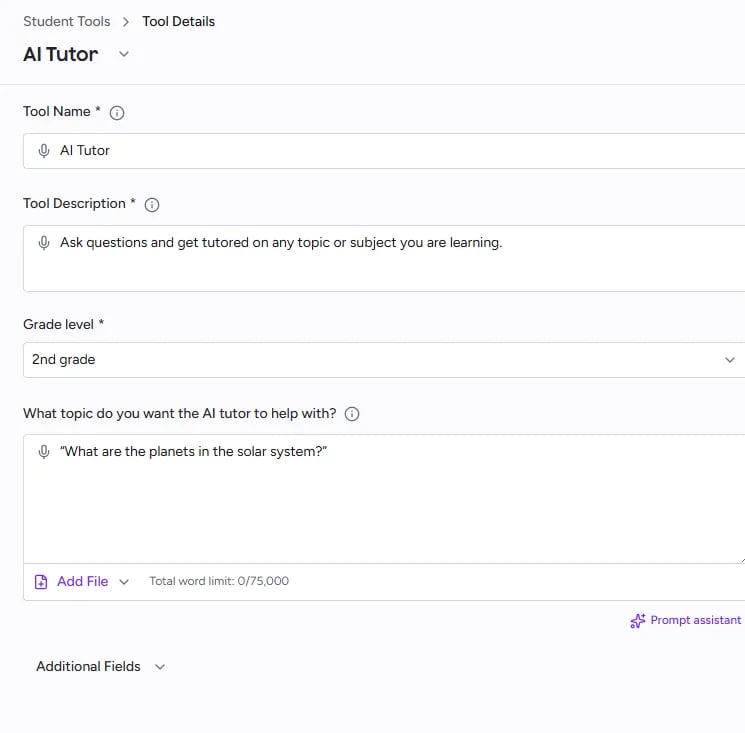
AI Tutor for Students
MagicSchool AI also includes interactive AI tutoring tools for students.
This feature allows students to:
ask questions
explore topics
receive simple explanations
learn step-by-step
inside a safe learning environment.
I liked how the AI Tutor explained complex topics using very simple words that younger students could easily understand.
If you enjoy exploring beginner-friendly AI platforms, you may also like:
Gemini AI Daily Tasks Guide 2026
Example of AI Tutoring in Action
In this example, the AI Tutor explains the solar system to a 2nd grade student.
The AI responds like a real tutor by:
asking questions
encouraging interaction
explaining concepts clearly
making learning feel conversational
This makes learning feel much more engaging compared to traditional study methods.
It’s especially useful for:
elementary students
homework help
self-paced learning
classroom support
Educational Resource Suggestions
Another useful feature is resource recommendations.
MagicSchool AI can suggest:
books
classroom activities
educational videos
printable materials
learning websites
based on the lesson topic.
This makes classroom preparation much easier for teachers.
Instead of searching manually for resources, the AI helps organize everything in one workflow.
Key Features of MagicSchool AI
• AI Lesson Plan Generator
Create classroom-ready lesson plans quickly.
• Quiz & Worksheet Creation
Generate quizzes and worksheets automatically.
• AI Tutoring
Help students learn interactively.
• Writing Feedback Tools
Provide faster grading and student feedback.
• Classroom Resource Suggestions
Discover learning materials instantly.
• Beginner-Friendly Interface
Simple dashboard designed specifically for teachers.
Pros of MagicSchool AI
• Saves Teachers Time
Reduces repetitive classroom preparation work.
• Easy to Use
The platform is clean and beginner friendly.
• Built Specifically for Education
Unlike normal AI chatbots, MagicSchool AI focuses on classroom workflows.
• Interactive Learning Support
The AI Tutor feature is surprisingly engaging for students.
• Many Useful Tools in One Platform
Lesson planning, tutoring, quizzes, and feedback tools are all connected together.
Cons of MagicSchool AI
• AI Content Still Needs Human Review
Teachers should always review AI-generated classroom content.
• Some Features Are Paid
Advanced tools may require a subscription.
• Large Tool Library Can Feel Overwhelming
New users may need time to explore all the features.
Quick Comparison of AI Education Tools
Different education AI tools solve different problems. Some focus on tutoring, while others help teachers improve classroom productivity and lesson preparation.
Is MagicSchool AI Worth Using?
For many teachers, absolutely yes.
MagicSchool AI helps simplify:
lesson planning
classroom preparation
quizzes
tutoring
student support
Instead of replacing teachers, it works more like a smart classroom assistant.
The biggest strength of the platform is that it understands educational workflows much better than general AI tools.
If you want to explore more AI productivity platforms, you may also enjoy:
Allen AI Guide 2026: Research, Blogging, and SEO Workflows
Final Verdict
MagicSchool AI is one of the most useful AI education platforms available in 2026.
After testing the platform, the strongest features were:
AI lesson planning
interactive tutoring
classroom resource suggestions
beginner-friendly design
The platform feels practical, simple, and genuinely useful for real classroom work.
For teachers who want to:
save time
reduce workload
create better classroom materials
explore AI safely
MagicSchool AI is definitely worth trying in 2026.