
Best AI Tools for Excel Data Cleaning & Duplicate Removal (2026 Guide)
Clean your Excel data in minutes using AI. Discover the best AI tools for data cleaning, duplicate removal, and automation in 2026. Step-by-step guide included.
AI TOOLS
Dipjyoti Sharma
4/24/20262 min read
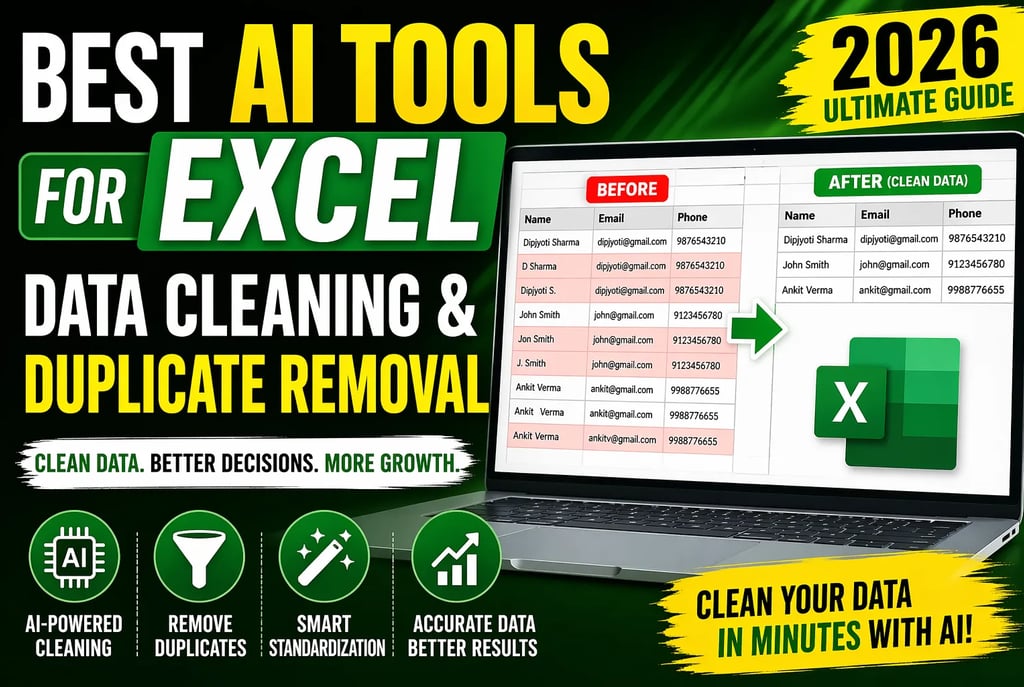
Best AI Tools for Excel Data Cleaning & Duplicate Removal (2026 Ultimate Guide)
Looking for the best AI tools for Excel data cleaning and duplicate removal in 2026? This guide will show you exactly how to remove duplicates in Excel using AI, automate your workflow, and improve data accuracy without manual effort.
Messy spreadsheets are one of the biggest hidden problems in modern business. Duplicate entries, inconsistent formats, and missing values reduce efficiency and lead to poor decisions.
AI-powered tools solve this by automating data cleaning, detecting duplicate records, and standardizing datasets instantly.
In this guide, you’ll learn:
Best AI tools for Excel data cleaning
How to remove duplicates in Excel using AI
Advanced automation workflows
Real-world business applications
Why Data Cleaning Is Critical in 2026
Data is the foundation of every decision.
Poor data quality leads to:
Duplicate customer records
Incorrect reporting
Weak targeting
Lost revenue
Example:
A single customer appears multiple times with slight variations. Your system treats them as different users, leading to repeated communication and inaccurate insights.
Clean data ensures consistency, accuracy, and better decision-making.
How AI Improves Excel Data Cleaning
Traditional Excel cleaning relies on:
Filters
Formulas
Manual work
AI introduces:
Pattern recognition
Fuzzy matching (detect similar duplicates)
Natural language commands
Example:
Dipjyoti Sharma D Sharma Dipjyoti S.
Standard Excel → 3 records
AI → 1 unified record
Best AI Tools for Excel Data Cleaning (2026)
1. Microsoft Excel + Copilot (Best Overall)
Remove duplicates using simple commands
Clean inconsistent formats
Detect anomalies automatically
Best for: Daily business use
2. Power Query (Best for Automation)
Build repeatable workflows
Merge duplicate records
Process large datasets
Best for: Advanced users and automation
3. GPT for Work (Best for Bulk Cleaning)
Clean thousands of rows instantly
Standardize columns
Detect duplicates at scale
Best for: Large datasets
4. Numerous.ai (Best for Beginners)
Easy prompt-based cleaning
Basic duplicate detection
Best for: Non-technical users
5. Julius AI (Best No-Code Tool)
Upload → Clean → Download
Fully automated
Best for: Simple workflows
Comparison Table (Quick Decision Guide)
Step-by-Step: Remove Duplicates in Excel Using AI
Step 1: Import Data
Load your Excel file
Step 2: Select Key Column
Choose:
Email
Phone
Customer ID
Step 3: Run AI Command
Examples:
Remove duplicates based on email
Merge similar entries
Step 4: Standardize Data
Fix capitalization
Normalize dates
Clean addresses
Step 5: Export Clean Data
Now your data is accurate and ready to use
Advanced Techniques
Fuzzy Matching
Detects:
Similar names
Typos
Variations
Data Enrichment
Fill missing values
Improve data quality
Automation Pipelines
Use Power Query to automate recurring tasks
Multi-File Cleaning
Clean data across multiple sheets or files
Real Business Use Cases
Customer Data
Remove duplicates and improve targeting
Sales Reports
Accurate revenue tracking
Supplier Lists
Clean vendor data
Expand Your AI Workflow (Internal Resources)
Once your data is clean, you can scale your workflow:
Learn how to automate content creation using AI → https://simplifiedaihub.com/rytr-ai-review-2026
Improve email productivity with AI → https://simplifiedaihub.com/gmail-ai-upgrade-2026
Discover how to make money using AI tools → https://simplifiedaihub.com/make-money-with-ai-in-2026-best-tools-and-strategies-in-the-usa
Create professional presentations with AI → https://simplifiedaihub.com/gamma-ai-ppt-2026-create-stunning-presentations-in-minutes
Contextual use:
Use Rytr AI for report generation
Use Gmail AI for outreach
Use AI monetization strategies for business growth
Use Gamma AI for presentations
Common Mistakes to Avoid
Removing duplicates without selecting the correct column
Poor data structure
Not keeping backups
Why Clean Data Increases Revenue
Clean data improves:
Marketing performance
Customer targeting
Conversion rates
Decision-making
Better data leads to better results.
FAQs
How to remove duplicates in Excel using AI?
Use Excel Copilot or AI tools and run commands like removing duplicates based on email.
Which AI tool is best?
Excel + Copilot for most users, Power Query for automation.
Can AI detect similar duplicates?
Yes, using fuzzy matching.
Do I need coding?
No, most tools are no-code.
Final Verdict
AI has transformed Excel data cleaning. Tasks that once took hours can now be completed in minutes with higher accuracy.
Conclusion
Start with Excel + Copilot for immediate results.
If you handle large or recurring datasets, implement Power Query.
Take one dataset today, clean it using AI, and measure the improvement.
Then scale your workflow across your business.