How Grammarly AI Works in 2026 — Complete Beginner Guide + Features Explained
Learn how Grammarly AI works in 2026 with this complete beginner guide. Explore features, real use cases, pros, and tips to improve your writing faster.
,AI FOR BEGINNERSTECHNOLOGY & AIAI TOOLS
DIPJYOTI SHARMA
2/16/20265 min read
Are you curious about how Grammarly AI works in 2026 and whether it’s the right tool for your writing needs? Whether you’re a student, a professional, a blogger, or simply someone who wants to communicate more clearly, this complete beginner guide will walk you through everything you need to know — from what Grammarly AI is, to how it works, and how you can use its powerful AI features in everyday writing.
By the end of this guide, you will understand:
What Grammarly AI is and how it differs from traditional grammar checkers
How Grammarly AI works step by step in 2026
The latest Grammarly AI features explained for beginners
How to use Grammarly AI for emails, blogs, and other writing tasks
The pros and limitations of Grammarly AI
How Grammarly compares to other AI writing tools
Real-world insights from hands-on usage in 2026
Let’s get started.
Table of Contents
What Is Grammarly AI?
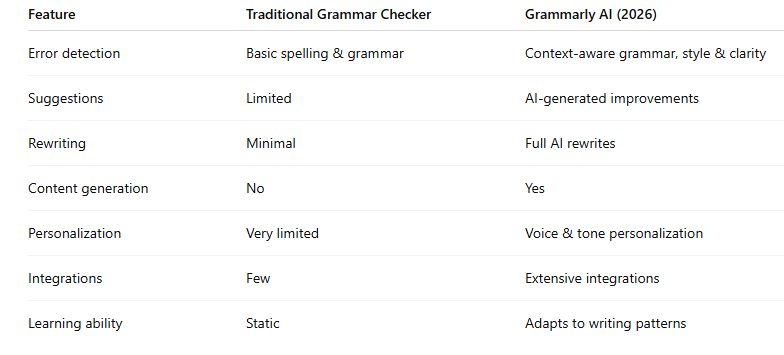
Grammarly AI vs. Traditional Grammar Checkers
How Grammarly AI Works in 2026 — Step by Step
Core Grammarly AI Features Explained for Beginners
Generative AI Features: Rewrite, Generate, and More
How Beginners Should Use Grammarly AI for Writing
Grammarly AI for Specific Use Cases
Grammarly AI Voice and Tone Personalization
Grammarly AI Assistant for Productivity
Pros and Limitations of Grammarly AI in 2026
Grammarly AI vs. Other AI Writing Tools (ChatGPT, Jasper, etc.)
Is Grammarly AI Worth It in 2026?
Real-World Experience with Grammarly AI (2026)
Grammarly AI Review 2026 — Final Verdict for Beginners
FAQ: Grammarly AI for Beginners
Conclusion: Should You Start Using Grammarly AI?
What Is Grammarly AI?
Grammarly AI is an advanced, artificial intelligence–powered writing assistant designed to help you write clearly, correctly, and effectively. Originally launched as a grammar checker in 2009, Grammarly has evolved into a full AI writing platform. In 2026, it combines large language models and machine learning to do much more than fix grammar — it can rewrite text, generate ideas, and adapt to your personal writing style.
Think of it as a writing coach, editor, and creative assistant working with you in real time. Today, millions of students, professionals, and creators rely on it to improve their communication.
Grammarly AI vs. Traditional Grammar Checkers
Traditional grammar tools mainly follow fixed rule-based systems. Grammarly AI goes beyond that by understanding context and intent.
In short, Grammarly AI acts as a complete writing assistant, not just an error checker.
How Grammarly AI Works in 2026 — Step by Step
Step 1: Input and Analysis
As soon as you start writing — whether in email, documents, or browsers — Grammarly AI begins analyzing your text in real time. It evaluates grammar, clarity, tone, and context instead of simply scanning for errors.
Step 2: AI-Powered Suggestions
The system generates suggestions such as:
Grammar and spelling corrections
Clarity improvements
Tone adjustments
Style enhancements
AI-generated rewrites
Step 3: Generative AI Capabilities
In 2026, generative features are central to Grammarly AI. You can:
Generate drafts from prompts
Rewrite entire paragraphs
Expand or shorten content
Match a personalized writing style
Step 4: User Interaction
You choose which suggestions to accept, reject, or modify. This keeps you in full control of your writing.
Step 5: Continuous Learning
Over time, Grammarly AI adapts to your decisions, improving its suggestions based on your preferences.
Core Grammarly AI Features Explained for Beginners
1. Advanced Grammar & Spell Check
AI-driven corrections understand meaning and sentence structure, catching complex mistakes beyond basic proofreading.
2. Clarity and Conciseness
It highlights wordy sentences and suggests cleaner, clearer alternatives.
3. Tone Detection
Grammarly identifies whether your tone feels friendly, formal, confident, or casual — and helps you adjust accordingly.
4. Plagiarism Detection
Premium plans include plagiarism scanning against billions of online sources.
5. Personalized Insights
The AI tracks writing patterns and offers insights, such as overuse of passive voice or repetitive wording.
Generative AI Features: Rewrite, Generate, and More
Generate
Create email drafts, outlines, or content ideas instantly from short prompts.
Rewrite
Highlight text to receive multiple rewritten versions in different styles.
Expand or Shorten
Quickly lengthen explanations or make writing more concise.
Brainstorming Support
Generate ideas, headlines, or phrasing alternatives when you’re stuck.
How Beginners Should Use Grammarly AI for Writing
Install the Grammarly browser extension or app
Start writing normally
Review suggestions as you type
Use Generate or Rewrite tools when needed
Create a voice profile for personalization
Monitor writing insights to improve over time
Grammarly AI for Specific Use Cases
Students
Improve essays and assignments
Check originality
Build stronger writing habits
Professionals
Write polished emails and reports
Improve client communication
Save editing time
Bloggers and Creators
Generate content ideas
Improve readability and tone
Maintain consistent style
Non-Native English Writers
Learn natural phrasing
Build confidence in communication
Grammarly AI Voice and Tone Personalization
Voice profiles allow Grammarly AI to align suggestions with your unique writing style. The more you use it, the better it understands how you prefer to communicate.
Grammarly AI Assistant for Productivity
Grammarly AI also works as a productivity tool by offering:
One-click email replies
Writing templates
Formatting improvements
Quick summarization and drafting support
Pros and Limitations of Grammarly AI in 2026
Pros
Context-aware corrections
Real-time assistance
Powerful generative features
Easy-to-use interface
Personalized writing support
Works across many platforms
Limitations
Advanced features require paid plans
Suggestions may occasionally overcorrect
Internet connection needed
Some users may have privacy concerns
Not a complete substitute for human editing
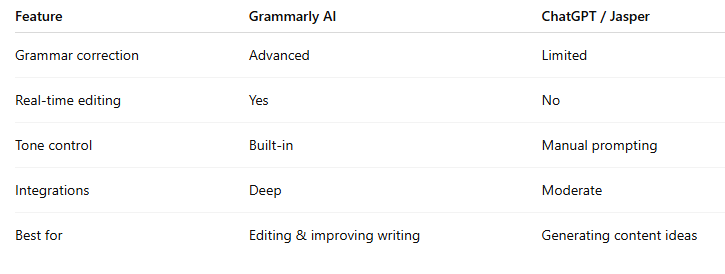
Grammarly AI vs. Other AI Writing Tools
Compared with tools like OpenAI ChatGPT or Jasper, Grammarly AI focuses more on real-time editing and refinement rather than long-form generation.
Is Grammarly AI Worth It in 2026?
For anyone who writes regularly, Grammarly AI can save time, reduce errors, and improve clarity. The free plan works well for basic needs, while premium plans unlock more advanced AI features and personalization.
Real-World Experience with Grammarly AI (2026)
After using Grammarly AI daily since its major generative AI upgrade, several practical insights stand out:
1. It Takes Time to Build Trust
At first, some suggestions may feel too formal or slightly off. After customizing voice settings and giving feedback, suggestions become more aligned with your style.
2. Draft Generation Saves Time
Generated drafts provide strong structure and reduce planning effort, even though personalization is still needed.
3. Tone Detection Helps Avoid Miscommunication
Tone suggestions are useful for preventing messages that sound too harsh or overly formal.
4. More Than Error Correction
The generate and expand features help overcome writer’s block and spark ideas.
5. Privacy Awareness Matters
While Grammarly emphasizes privacy, it’s still wise to avoid highly sensitive content when possible.
6. Human Review Is Essential
AI improves writing, but final judgment should always come from the writer.
Bottom line: Grammarly AI works best as a writing co-pilot rather than a replacement for human thinking.
Grammarly AI Review 2026 — Final Verdict for Beginners
In 2026, Grammarly AI has evolved into a complete writing partner. It combines real-time editing, generative AI, and personalization to help writers communicate more confidently and efficiently.
The strongest results come when you treat it as a tool that enhances your writing — not replaces it.
FAQ: Grammarly AI for Beginners
Is Grammarly AI free?
Yes, but advanced AI features require paid plans.
Can it write full articles?
Yes, though human editing is recommended.
Will it replace human editors?
No. It works best as an assistant.
Is it safe to use?
Generally yes, but review privacy policies if handling sensitive information.
Conclusion: Should You Start Using Grammarly AI?
If your goal is to write faster, clearer, and with more confidence, Grammarly AI in 2026 is a strong companion for writers of all levels. It combines grammar correction, AI writing support, and personalization into one tool that fits naturally into daily workflows.
Give it a try — you may quickly find it becoming part of your regular writing routine.
Related AI Tutorials (Recommended Reading)
OpenAI Full Tutorial — Beginner to Power User (2026)
Want to master OpenAI tools step-by-step? Read the complete beginner-to-advanced guide here:
➡️ https://www.asimplifiedhub.blog/2026/02/openai-full-tutorial-2026-beginner-to-power-user.html
Gemini AI Full Tutorial — Complete Beginner to Pro Guide (2026)
Explore advanced features, workflows, and practical use cases inside this full Gemini AI tutorial:
➡️ https://simplifiedaihub.com/gemini-ai-full-tutorial-2026-complete-beginner-to-pro-guide-advanced-features-explained
NotebookLM Complete Guide (2026)
Learn how to use NotebookLM for research, study, and AI-powered knowledge management:
➡️ https://www.asimplifiedhub.blog/2026/02/notebooklm-complete-guide-2026.html