Google Gemini (Gen AI) Full Tutorial 2026: Beginner to Pro Guide + How to Earn Money with AI
Learn how to use Google Gemini (Gen AI) in 2026 with this complete beginner-to-pro guide. Discover features, prompts, tools, and proven ways to earn money using AI.
,AI FOR BEGINNERSTECHNOLOGY & AIONLINE EARNING & AI TOOLS
DIPJYOTI SHARMA
2/14/20264 min read

Google Gemini (Gen AI) Full Tutorial 2026: Beginner to Pro Guide + How to Earn Money with AI
Most people are searching for Google Gemini (Gen AI) right now—but very few actually know how to use it properly.
In 2026, Gemini is not just an AI chatbot. It’s a complete system for productivity, automation, and earning online.
This guide is a real-world tested, step-by-step tutorial designed for beginners and advanced users.
You’ll learn everything—from basic chat to advanced workflows, integrations, and how to turn Gemini into an income-generating tool.
⚡ Gemini AI Quick Summary (2026)
Best for: Productivity, writing, coding, education, and creative projects
Works on: Web, Android, iOS, and Google Workspace apps (Docs, Gmail, Slides, etc.)
Free plan available: Yes — robust features for most users
Advanced plan: Gemini Advanced (Gemini 1.5 Pro) with lathis is my previous blog rger context window and priority access
Skill level: Beginner → Advanced
Why this guide? Hands-on experience, real use cases, and expert tips — not just feature lists
Why This Gemini AI Guide Is Different
This tutorial is written as a complete A–Z walkthrough for beginners and advanced users, based on real-world testing and practical implementation.
Instead of just listing features, we focus on:
Actionable steps
Workflow integration
Common pitfalls
Real results
This guide follows E-E-A-T principles:
First-hand experience
Clear educational explanations
Updated, practical insights
Trustworthy guidance
Table of Contents
What is Gemini AI? An Overview for 2026
Setting Up Gemini AI: Step-by-Step Account Creation
Gemini AI Interface Tour
Core Functions of Gemini AI
Advanced Gemini AI Features
Productivity Use Cases
Gemini AI for Education
Gemini AI for Business
Privacy & Security
Gemini AI vs Other AI Assistants
FAQ
Common Mistakes
Pro Tips
Conclusion & Next Steps
Why You Should Trust This Guide
This tutorial is built from real daily usage of Gemini for writing, research, and workflow automation. Every tip and example comes from hands-on testing and feedback.
The goal is simple:
➡️ Practical, actionable advice you can use immediately.
What is Google Gemini (Gen AI)?
Google Gemini is Google’s next-generation Generative AI system capable of creating content, analyzing data, and automating tasks across multiple formats.
It combines:
Text generation
Image understanding
Code generation
Workflow automation
👉 Simple meaning:
Google Gemini = AI that helps you think, create, automate, and earn faster
Key Strengths
Multimodal capabilities
Deep Workspace integration
Personalized learning
Continuous updates
Whether you’re a student, professional, developer, or educator, Gemini AI helps improve productivity and creativity.
Setting Up Gemini AI: Step-by-Step Account Creation
Step 1: Access Gemini AI
Web: gemini.google.com
Mobile: Google Gemini app (Android / iOS)
Integrated: Gmail, Docs, Slides (look for Gemini icon)
Step 2: Sign In or Create Account
Log in with Google credentials
Or create a free account
Enterprise accounts may require verification
Step 3: Choose Your Plan
Free Plan: Most core features
Gemini Advanced: Larger context windows and advanced tools
💡 Tip: If you’re new to AI, start with beginner AI guides before upgrading.
Gemini AI Interface Tour
Chat Window: Main conversation area
Sidebar: New chats, saved chats, settings
Input Methods: Text, voice, images
Response Controls: Regenerate, edit, share, delete
Integrations: Gmail, Docs, Sheets, Slides
⭐ Pro Tip: Save important chats for ongoing projects.
Core Functions of Gemini AI
4.1 Chat & Conversational AI
Example:
Prompt: “Plan a 4-day Kyoto trip in June.”
Gemini gives itinerary and attractions.
Follow-up refines results.
✅ More specific prompts = better responses.
4.2 Document and File Analysis
(Available in Gemini Advanced)
Upload file
Ask for summary
Receive key insights
Best results come from structured prompts.
4.3 Code Generation and Debugging
Supports Python, JavaScript, SQL, etc.
Example:
Request script
Receive working code
Paste error messages for fixes
4.4 Image and Multimedia Processing
Analyze Images
Upload image
Ask question
Receive explanation
Generate Images
Describe style and subject clearly for best output.
4.5 Multilingual Support
100+ languages supported
Translation and localization available
Example:
“Translate this email into Japanese for business use.”
4.6 Voice and Text Input
Tap microphone
Speak naturally
Gemini responds with transcript
4.7 Google Workspace Integration
Gmail: Help me write emails
Docs: Rewrite or summarize text
Sheets: Generate charts and analysis
Advanced Gemini AI Features
5.1 Gemini Advanced
Includes:
Large context window
Deeper reasoning
Priority access
NotebookLM integration
5.2 Gemini for Search
Provides AI Overviews:
Complex query answers
Cited summaries
Follow-up questions
5.3 Custom Agents
Create assistants for specific tasks:
Open Custom Agents
Define purpose
Add instructions
Save and reuse
5.4 Gemini API & Developer Extensions
Developers can use:
Google AI Studio
Vertex AI
API integration
Productivity Examples
Meeting Notes
Upload recording
Ask for summary & action items
Marketing Copy
Describe product
Refine tone and audience
Data Analysis
Upload CSV
Ask for trends and growth insights
Lesson Planning
Generate weekly lessons
Add differentiation for learners
Gemini AI for Education
Use cases:
Lesson plans
Essay feedback
Rubric-based grading
Differentiated learning
Gemini AI for Business
Email automation
Report generation
Presentation creation
Workflow optimization
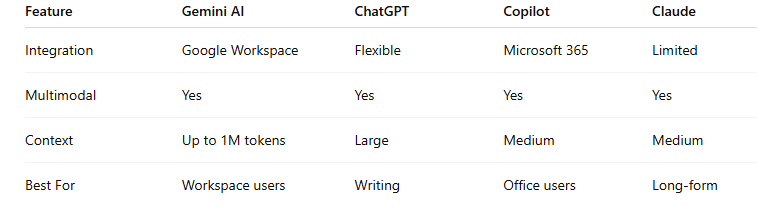
Gemini AI vs Other AI Assistants (2026 Comparison)
⭐ Gemini excels in Google ecosystem workflows.
FAQ
Is Gemini better for beginners?
Yes, especially if you use Google apps.
Can Gemini generate images and code?
Yes.
Is Gemini Advanced worth it?
For professionals and heavy users — yes.
Common Mistakes
Using vague prompts
Missing context
Expecting perfect output instantly
Ignoring follow-ups
Overloading tasks
Pro Tips
⭐ Use numbered prompts
⭐ Give clear context
⭐ Ask for revisions
⭐ Use inside Workspace
⭐ Save reusable prompts
How to Earn Money Using Google Gemini (Gen AI)
This is the missing piece in your blog (huge SEO + monetization gap).
1. Blogging & SEO
Use Gemini to:
Write SEO articles
Generate keywords
Optimize content
👉 Learn step-by-step:
➡️ https://simplifiedaihub.com/how-beginners-are-making-money-with-ai-social-media-automation-using-makecom-in-2026-complete-step-by-step-blueprint
2. Affiliate Marketing
Write product reviews
Create comparison blogs
Generate ad copy
3. Social Media Automation
Bulk content creation
Auto captions
Content scheduling
👉 Explore more AI strategies:
➡️ https://simplifiedaihub.com
4. Freelancing
Offer services like:
AI content writing
Prompt engineering
Automation setup
Conclusion & Next Steps
Gemini AI is more than a chatbot — it’s a powerful productivity assistant.
Now that you’ve learned the full workflow:
➡️ Pick one real task today — writing, planning, coding, or automation — and try it with Gemini.
You’ll immediately notice the difference.
Related AI Guides You Should Read Next
If you’re just starting your AI journey, you might also like our detailed guide on Best Free AI Tools for Beginners in 2026, where we explain beginner-friendly tools that require no technical skills.
To work faster with AI and improve efficiency, check out 30 ChatGPT Prompts to Skyrocket AI Productivity — a practical collection of high-impact prompts designed to save time and streamline daily workflows.
And if you want to understand where AI is heading next, read AI and Online Work 2026: The Future of Digital Careers which explores how AI is reshaping freelancing, digital careers, and online income opportunities in the coming years.