NotebookLM Tutorial 2026: How to Use It Like a Pro (Second Brain Method)
Discover how to use NotebookLM correctly in 2026. Learn the “second brain” method, save hours of research, and create high-quality content faster.
AI TOOLS
DIPJYOTI SHARMA
3/31/20266 min read
NotebookLM Tutorial 2026: How I Use It as an AI Second Brain
Artificial intelligence is transforming the way we study, research, write, and organize information. In 2026, one of the most powerful AI productivity tools available is Google NotebookLM.
Unlike traditional note-taking apps, NotebookLM does far more than store notes. It understands your documents, answers questions based on your files, creates summaries, generates quizzes, builds flashcards, and even produces AI-powered reports and video overviews.
After using NotebookLM extensively for blogging, research, fiction writing, and content organization, I realized something important:
NotebookLM works best when treated as an AI-powered second brain.
In this complete NotebookLM tutorial, I’ll show you:
how to use NotebookLM
how to create notebooks
how to upload files
how to generate AI summaries
how to use quizzes and flashcards
how to organize knowledge efficiently
how to turn NotebookLM into your personal AI productivity system
If you work with information daily, this tool can genuinely improve your workflow.
What Is NotebookLM?
NotebookLM is an AI-powered research and knowledge assistant developed by Google.
Instead of simply saving notes like traditional apps, NotebookLM analyzes your uploaded content and allows you to interact with it using conversational AI.
You can upload:
PDFs
DOCX files
Google Docs
copied text
websites
research materials
books
scripts
study notes
The AI then creates an interactive learning and research environment around your uploaded content.
This makes NotebookLM extremely useful for:
students
bloggers
researchers
authors
educators
YouTubers
marketers
digital creators
Compared to normal note-taking apps, NotebookLM feels closer to having an AI research assistant.
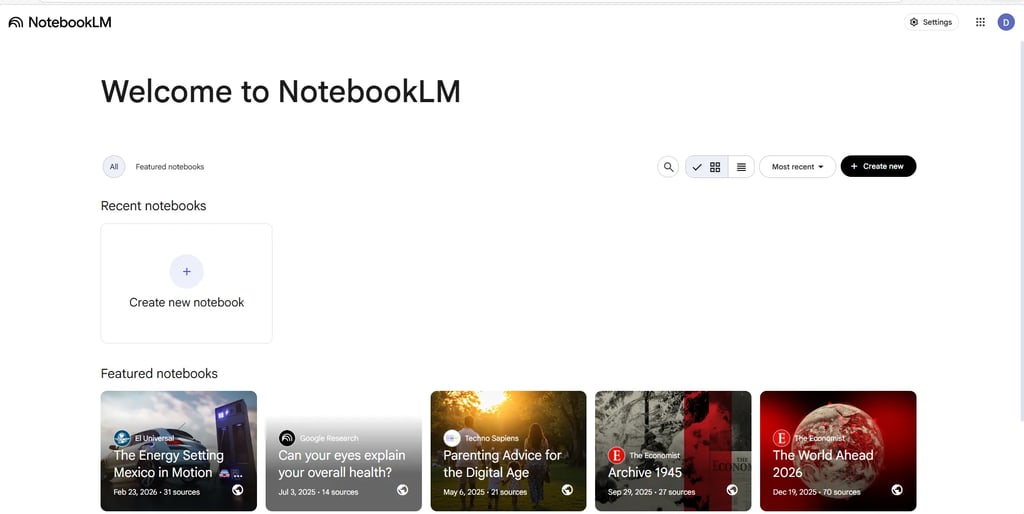
NotebookLM Dashboard Overview
NotebookLM dashboard interface overview
When you open NotebookLM, you’ll see a clean dashboard where all your notebooks are organized.
You can:
create notebooks
manage research projects
upload documents
organize ideas
access AI learning tools
The interface is simple enough for beginners while still being powerful for advanced users.
Creating Your First Notebook
Creating a notebook is extremely simple.
Click the “Create New Notebook” button and give your project a title.
You can create notebooks for:
blog research
content planning
novel writing
exam preparation
AI workflows
online business research
educational projects
NotebookLM works best when each notebook focuses on a single topic or project.
Uploading Sources to NotebookLM
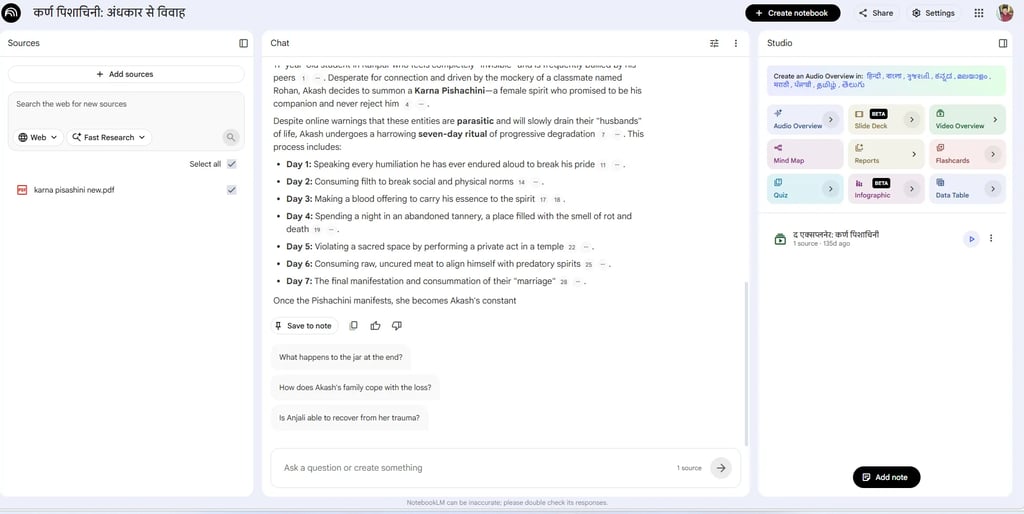
Uploading sources in NotebookLM
After creating your notebook, upload your documents and sources.
NotebookLM supports:
PDFs
DOCX files
Google Docs
copied text
web pages
The AI scans every uploaded source and creates a searchable knowledge system around it.
This is where NotebookLM becomes much more powerful than traditional note apps.
Instead of manually searching through notes, you can ask questions directly to the AI.
Why NotebookLM Feels Like an AI Second Brain
Traditional note apps store information.
NotebookLM understands information.
That difference completely changes productivity.
Instead of scrolling through hundreds of notes, you can ask:
“Summarize this chapter”
“What are the key themes?”
“Generate revision questions”
“Explain this simply”
“Create study flashcards”
NotebookLM instantly answers using only your uploaded materials.
Many creators are now combining NotebookLM with modern AI productivity systems and AI second brain workflow methods to organize information faster.
This is one reason why NotebookLM is becoming popular among:
researchers
students
writers
bloggers
knowledge workers
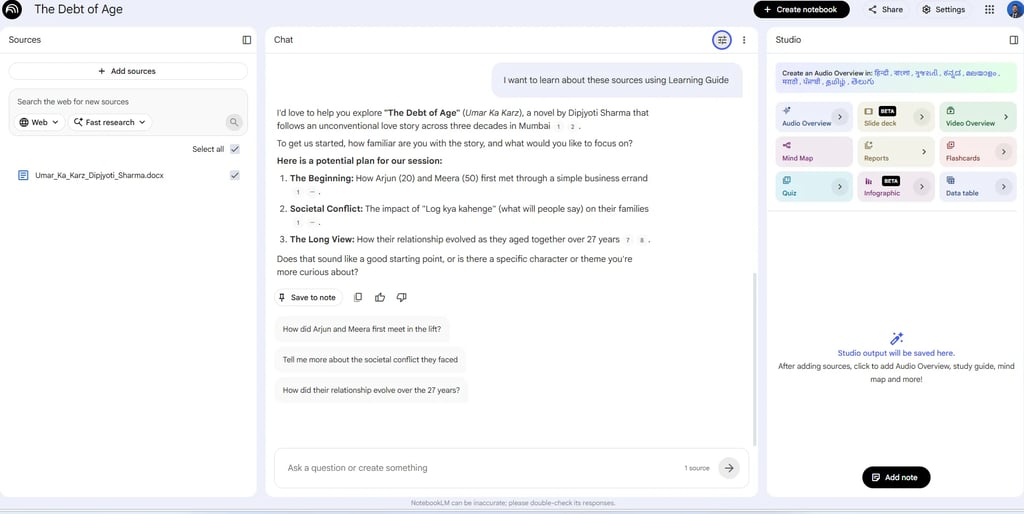
Using NotebookLM Learning Guide
NotebookLM learning guide feature
One of the best features inside NotebookLM is the AI-generated Learning Guide.
The system automatically creates:
guided summaries
discussion paths
important themes
learning prompts
topic breakdowns
This feature helps users understand long documents faster.
For students and researchers, this can save hours of manual reading and note organization.
It also works extremely well for authors analyzing novels or complex documents.
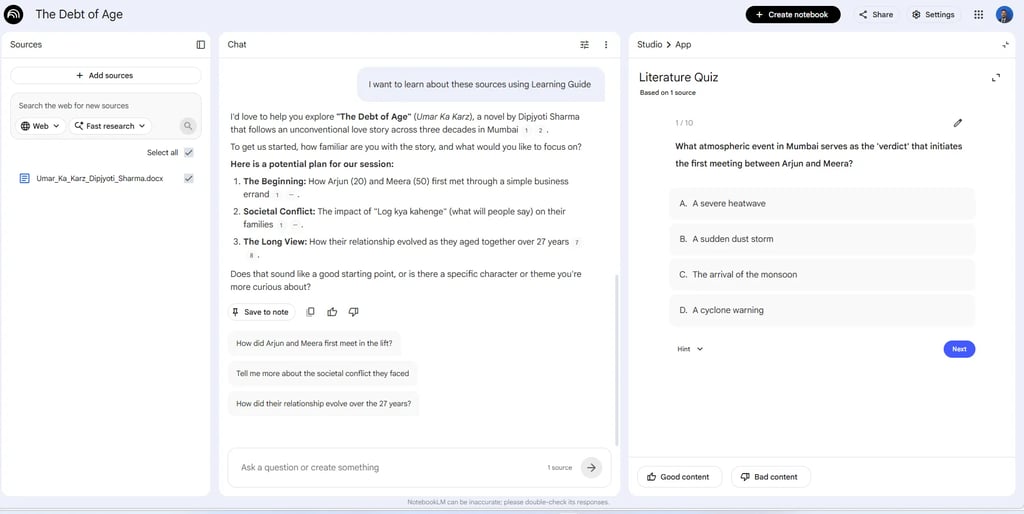
AI Quiz Generation Feature
AI generated quiz inside NotebookLM
NotebookLM can automatically generate quizzes from uploaded documents.
The AI creates:
multiple-choice questions
revision exercises
comprehension tests
topic-based assessments
This feature is especially useful for:
exam preparation
online learning
self-testing
educational workflows
Compared to traditional study methods, NotebookLM makes revision far more interactive.
Smart Flashcards for Faster Learning
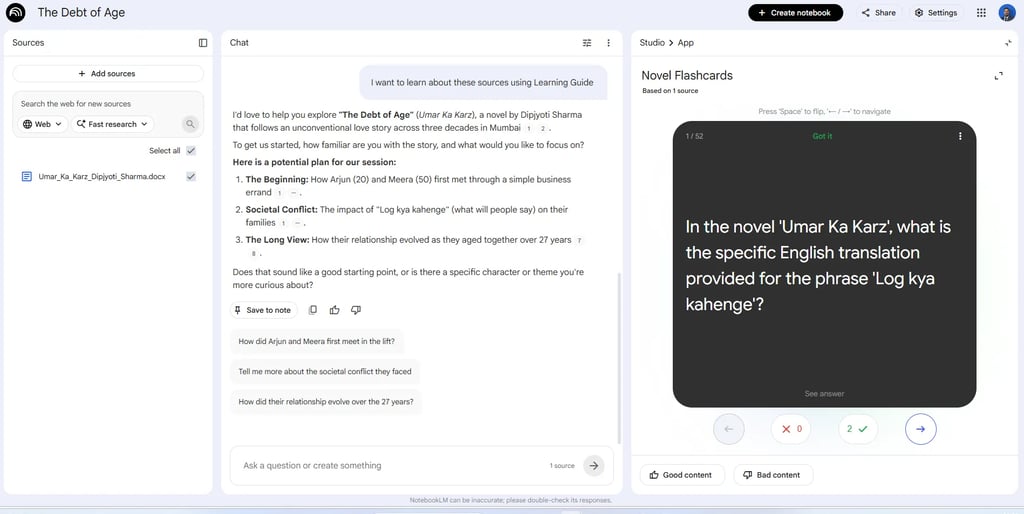
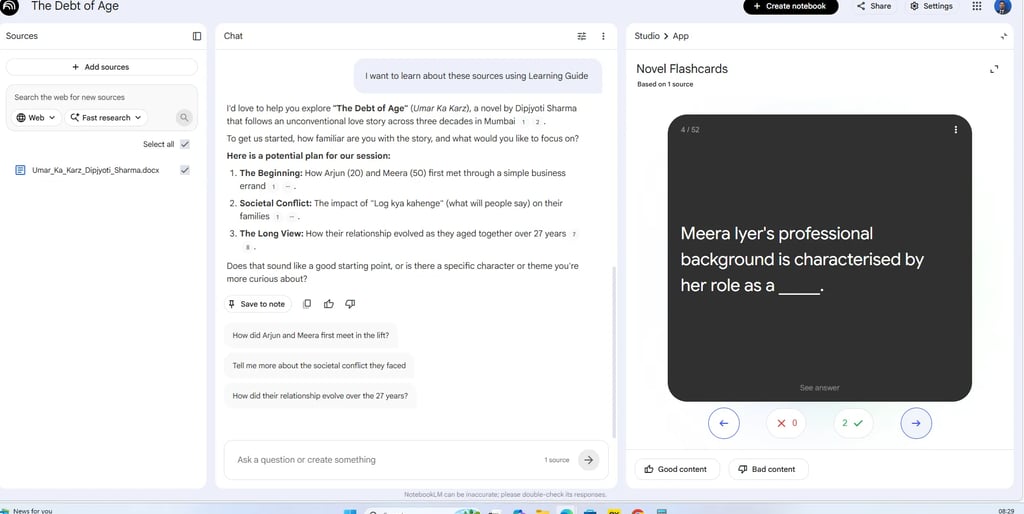
NotebookLM flashcard interface
AI generated flashcards in NotebookLM
Another impressive feature is automatic flashcard generation.
NotebookLM extracts:
key concepts
character details
important definitions
themes
explanations
factual information
Students, bloggers, and researchers can revise information much faster without manually building flashcards.
This is one of the strongest productivity features inside NotebookLM.
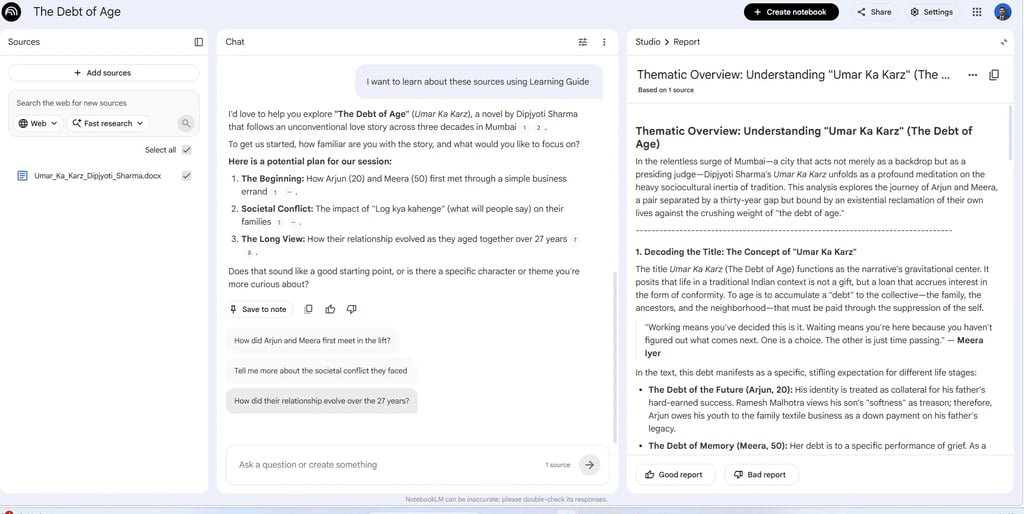
AI-Generated Reports and Analysis
NotebookLM report generation feature
NotebookLM can also generate detailed reports and thematic analysis from uploaded documents.
The AI identifies:
major themes
important ideas
contextual insights
relationships between topics
structural summaries
This feature is incredibly useful for:
bloggers
educators
fiction writers
journalists
researchers
If you regularly analyze long-form content, this can save a massive amount of time.
Bloggers using modern AI content creation tools can especially benefit from these AI-generated summaries and insights.
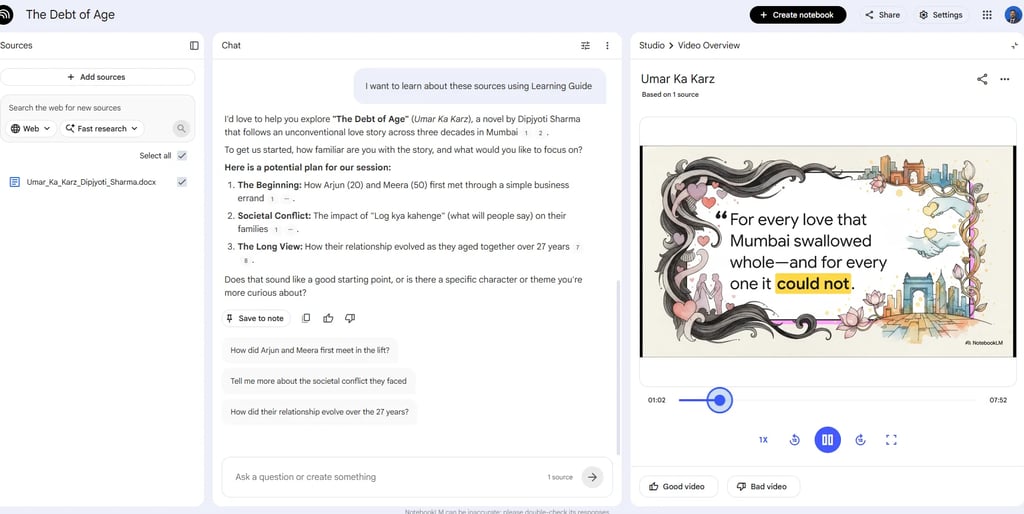
AI Video Overview Feature
NotebookLM AI video overview feature
One of the newest NotebookLM features is AI-generated video overviews.
NotebookLM converts uploaded information into visual learning experiences.
Instead of reading only text summaries, users can interact with:
visual explanations
multimedia learning
AI-powered educational presentations
This makes learning more engaging and interactive compared to traditional note-taking apps.
My Real Experience Using NotebookLM
After testing NotebookLM for multiple projects, I noticed several things immediately.
What I Liked Most
Extremely fast document understanding
Useful summaries
Strong quiz generation
Smart flashcards
Excellent organization system
Beginner-friendly design
What Surprised Me
The biggest surprise was how useful NotebookLM became for creative work.
It works very well for:
novel analysis
research organization
script planning
long-form writing
educational workflows
Limitations
NotebookLM is powerful, but it still has some limitations:
occasional AI inaccuracies
limited customization options
dependency on uploaded source quality
internet connection requirement
Still, the productivity improvement compared to normal note-taking apps is significant.
Best Ways to Use NotebookLM in 2026
For Students
exam preparation
study summaries
revision flashcards
quiz practice
learning guides
For Bloggers
topic research
article planning
content organization
keyword clustering
idea generation
Creators using modern autoblogging AI tools can also use NotebookLM to organize research and improve content workflows.
For Authors
character tracking
story planning
manuscript organization
thematic analysis
research storage
For Businesses
knowledge management
document analysis
workflow organization
research summaries
team learning systems
NotebookLM vs Traditional Note Apps
NotebookLM feels more like an intelligent AI research assistant than a basic note-taking app.
Is NotebookLM Worth Using in 2026?
Yes — especially if you work with large amounts of information.
NotebookLM combines:
AI summaries
flashcards
quizzes
reports
conversational learning
multimedia understanding
into one productivity system.
For students, researchers, bloggers, and creators, it can dramatically improve:
organization
learning
writing
research speed
information retrieval
This is why NotebookLM is quickly becoming one of the best AI productivity tools in 2026.
Final Thoughts
NotebookLM is far more than a note-taking application.
It’s an AI-powered knowledge system that helps you:
learn faster
organize information
analyze research
create better workflows
build a personal AI second brain
If you regularly work with:
research
studying
blogging
writing
educational content
knowledge management
then NotebookLM is absolutely worth trying.
As AI productivity tools continue evolving, NotebookLM has strong potential to become one of the most important research and learning platforms available today.
FAQ
Is NotebookLM free?
NotebookLM currently offers free access, although some advanced features may vary depending on region and account access.
Can NotebookLM summarize PDFs?
Yes. NotebookLM can analyze and summarize PDFs, DOCX files, websites, and multiple document formats.
Is NotebookLM good for students?
Absolutely. Features like quizzes, flashcards, summaries, and learning guides make it excellent for studying.
Can bloggers use NotebookLM?
Yes. Bloggers can use it for topic research, planning, summaries, and content organization.
Does NotebookLM work like ChatGPT?
Partially. However, NotebookLM focuses specifically on your uploaded documents rather than general internet knowledge.
Related Guides You May Also Like
If you want to go deeper into practical AI usage and productivity, explore these helpful guides:
7 AI Tools for Remote Work That Boost Productivity in 2026 — Discover powerful AI tools that help remote workers automate tasks, improve collaboration, and increase daily productivity.
How Beginners Are Making Money with AI in 2026 — Learn beginner-friendly ways people are turning AI skills into real income through side hustles, content creation, and automation.
AI for Beginners: How to Choose the Right Tool for Learning and Research — A simple guide to selecting the best AI tools for studying, research, and everyday learning without feeling overwhelmed.