Sider AI Review 2026: How This AI Sidebar Cut My Workload in Half
Sider AI Review 2026: See how Sider AI cut my work time by 60%, compare top AI tools, and learn how to earn more with this all-in-one AI sidebar extension.
AI TOOLS
DIPJYOTI SHARMA
4/20/202610 min read


Sider AI Review 2026: How This AI Sidebar Cut My Workload in Half
I test AI tools constantly.
Writing tools.
Image generators.
Browser extensions.
Productivity assistants.
Some become part of my workflow.
Most quietly disappear after the first week.
When I first heard about Sider AI, I wasn’t expecting much.
An AI sidebar that combines chat, writing, image generation, research, summaries, and productivity tools?
Honestly, it sounded like one of those products trying to do everything at once.
And usually when software tries to do everything… it becomes confusing.
Still, curiosity won.
So instead of reading feature lists and watching demos, I decided to test Sider the way I test most tools:
I used it in an actual creator workflow.
No theory.
No sponsored talking points.
Just real use.
What Is Sider AI?
If you’re searching for a Sider AI review for bloggers, content creators, or people trying to reduce AI tool overload, here’s the simple explanation.
Sider AI is essentially an all-in-one AI productivity workspace built into a sidebar interface.
Instead of opening:
ChatGPT in one tab
an image generator in another
browser summarizers somewhere else
research tools in a separate extension
Sider tries to centralize everything.
You get access to:
✔ AI chat tools
✔ writing assistance
✔ image generation
✔ webpage summarization
✔ translation
✔ OCR tools
✔ research support
✔ productivity features
On paper?
Very attractive.
In practice?
That was what I wanted to find out.
My First Impression: Surprisingly Clean
The first thing that caught my attention was the dashboard.
Not flashy.
Not overloaded.
Actually usable.
That sounds small, but if you work with AI tools every day, you know usability matters.
A powerful tool with a messy interface can become exhausting very quickly.
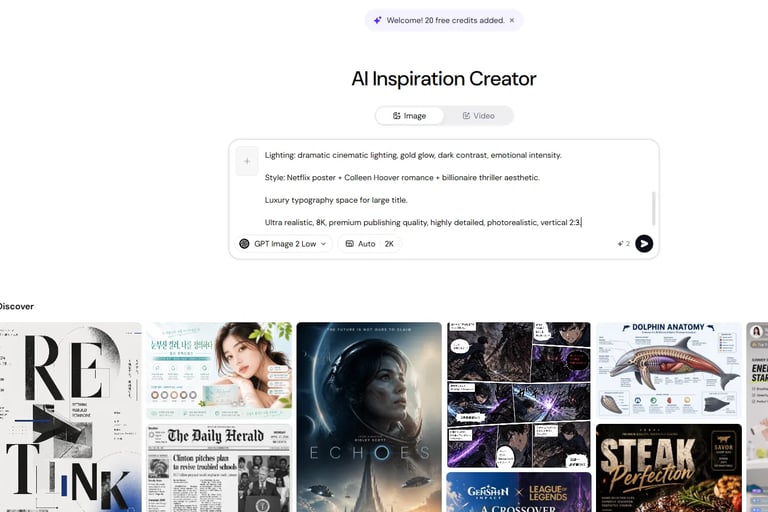
My first look inside Sider AI’s Creator dashboard.
The interface felt organized.
I wasn’t digging through hidden menus trying to figure out where features lived.
That lowered the friction immediately.
And honestly, reducing friction became a recurring theme throughout my testing.
I Didn’t Want a Feature Tour. I Wanted a Real Test.
Many AI reviews simply repeat product descriptions.
That’s not how I like testing tools.
I wanted to know:
Could Sider actually improve a real creator workflow?
So I gave myself a practical challenge.
I used Sider for a project I genuinely cared about.
My task:
Create a professional AI book cover concept using prompt engineering.
That required:
detailed prompts
image generation
revision cycles
composition testing
typography experiments
Basically… a workflow that normally creates tab chaos.
Perfect testing ground.
Testing Sider AI’s Image Generator
This is where things became interesting.
I opened the image creator and started building a long prompt.
Not a simple one.
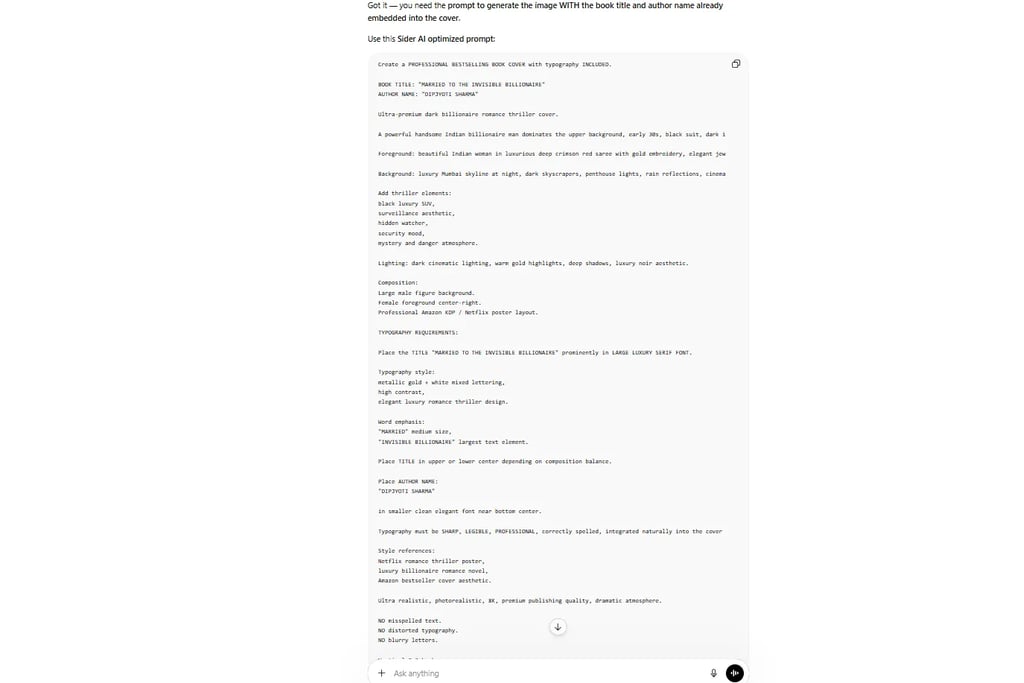
A detailed dark billionaire romance thriller book cover prompt with cinematic styling instructions.
Lighting.
Luxury atmosphere.
Character positioning.
Typography requirements.
Visual mood.
The works.
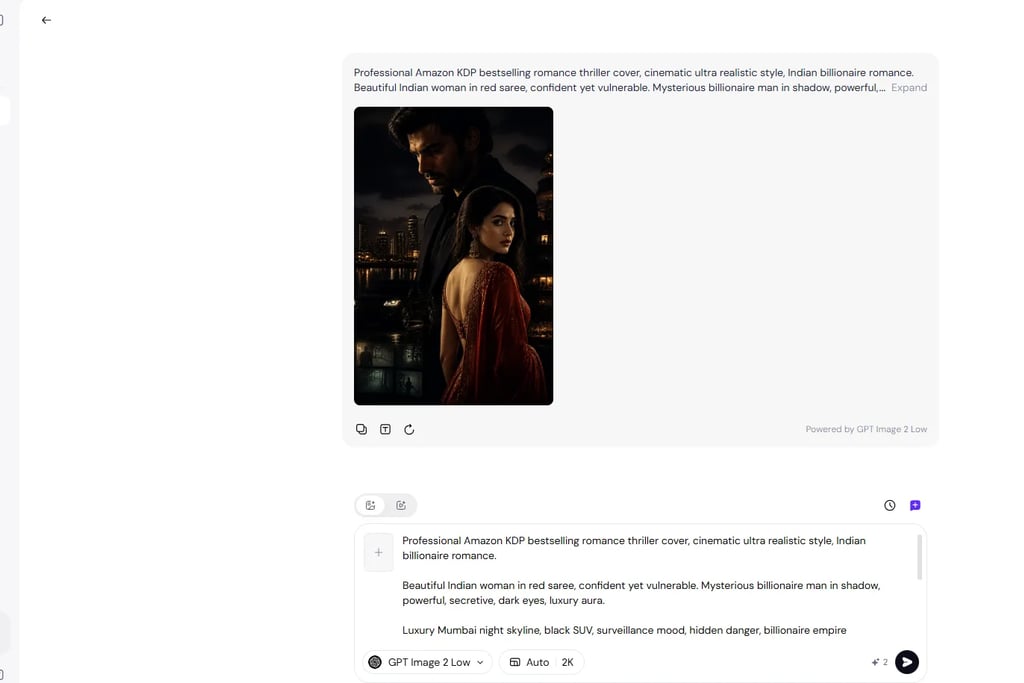
Sider AI image generator interface showing detailed book cover prompt input.
Testing Sider AI’s image creator using a cinematic romance thriller prompt.
One thing I appreciated immediately:
The prompt workflow didn’t feel restrictive.
Some image platforms become frustrating when prompts get longer or more detailed.
Sider handled detailed instructions reasonably well.
That mattered because I wasn’t testing simple “cute cat astronaut” prompts.
I was testing creator-level prompting.
If you’re interested in improving prompt quality, I’ve written a much deeper breakdown in my Prompt Engineering Master Guide 2026 on SimplifiedAIHub:
https://simplifiedaihub.com/prompt-engineering-master-guide-2026-how-to-write-powerful-ai-prompts
Prompt quality still changes output quality dramatically.
The First Results Were Better Than I Expected
I’m not going to pretend the first output was perfect.
It wasn’t.
But it surprised me.
The mood was strong.
The atmosphere felt cinematic.
The color palette worked.
The composition actually looked closer to a commercial cover concept than I expected.
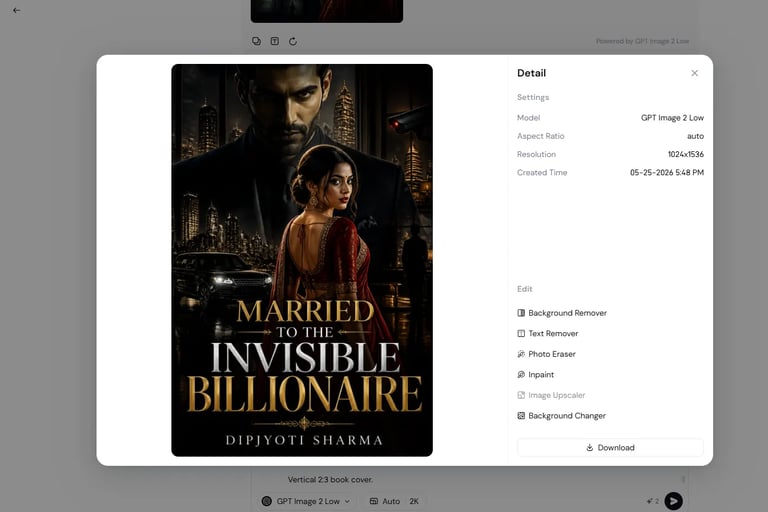
One of my generated outputs using Sider AI’s image generation tools.
That was the moment my mindset shifted slightly.
Because I realized I wasn’t spending as much time bouncing between platforms.
Normally my process looks something like this:
Open ChatGPT.
Build prompt.
Copy prompt.
Open image tool.
Test.
Revise.
Open notes.
Compare versions.
Adjust.
Repeat.
Creators know this routine.
It eats attention.
With Sider, parts of the workflow felt tighter.
Not magically transformed.
Just… tighter.
And surprisingly, that mattered more than I expected.
Where Sider Actually Reduced My Workload
The title of this review wasn’t clickbait.
I genuinely noticed workflow reduction.
Not because Sider replaced every tool I use.
It didn’t.
But because it reduced some of the constant context switching.
If you’re a blogger, writer, marketer, student, or AI enthusiast, you already know how much productivity disappears into tool juggling.
Open tab.
Switch tab.
Copy text.
Paste text.
Switch again.
That cognitive cost adds up.
Sider reduced some of that friction.
That’s probably the biggest compliment I can give an AI productivity tool.
My Real Workflow Still Included ChatGPT
I want to be transparent here.
I did not abandon my existing workflow overnight.
ChatGPT remained part of my process.
In fact, my real setup looked more like:
ChatGPT → Prompt Engineering → Sider Testing → Output Refinement
My actual workflow using ChatGPT alongside Sider AI.
That hybrid approach worked well.
And honestly, that’s probably how many creators operate in 2026.
Very few serious users rely on one single AI platform anymore.
The better question is not:
“Can Sider replace ChatGPT?”
The better question is:
“Can Sider improve my existing workflow?”
For me?
The answer started leaning toward yes.
One Thing I Didn’t Expect to Like: Convenience
Convenience sounds boring.
But convenience matters.
Everyone focuses on:
model intelligence
output quality
benchmark scores
feature lists
Those things matter.
But workflow convenience matters too.
Sometimes productivity gains don’t come from “smarter AI.”
They come from:
fewer interruptions.
fewer tabs.
less mental clutter.
That was one of Sider’s strongest qualities during my testing.
If you enjoy experimenting with productivity workflows and AI ecosystems, you might also like my guide:
The Ultimate Guide to AI Tools in 2026 — 50 Best AI Tools for Productivity, Business, and Creators
Testing Sider AI’s Writing Tools
After spending time with the image generator, I shifted toward another area I cared about more as a blogger:
writing productivity.
Because realistically, many people searching for a Sider AI review for content creators or Sider AI review for bloggers are not only generating images.
They’re:
writing articles
researching topics
summarizing webpages
rewriting paragraphs
brainstorming ideas
So I tested Sider inside a more familiar environment:
my normal content workflow.
I tried:
✔ short content drafting
✔ rewriting awkward sentences
✔ quick brainstorming
✔ summarization tasks
✔ research-style prompts
The experience felt… practical.
Not magical.
Practical.
And honestly, that’s a good thing.
Too many reviews try to oversell AI tools.
My experience was simpler:
Sider handled quick productivity tasks well.
The biggest advantage wasn’t necessarily “better intelligence.”
It was workflow convenience.
Again.
That theme kept appearing.
Sider AI vs My Normal Workflow
To make this review more useful, I compared Sider against how I normally work.
Here’s the honest version.
My Usual Workflow
Before Sider:
ChatGPT → Browser Tabs → Image Tool → Notes App → Summarizer → Research Tabs → More Tabs.
Productive?
Yes.
Messy?
Also yes.
Workflow With Sider
During testing:
ChatGPT → Sider → Fewer context switches.
Still hybrid.
Still imperfect.
But noticeably cleaner.
Here’s the simplest comparison I can make:
That doesn’t mean Sider completely replaced my setup.
It didn’t.
But it reduced tool juggling.
That matters more than many people realize.
The Typography Experiment: Where Things Got Harder
One area I intentionally stress-tested was AI typography.
Because AI-generated text inside images is still tricky across most platforms.
So I pushed Sider harder.
I wanted a full book cover including:
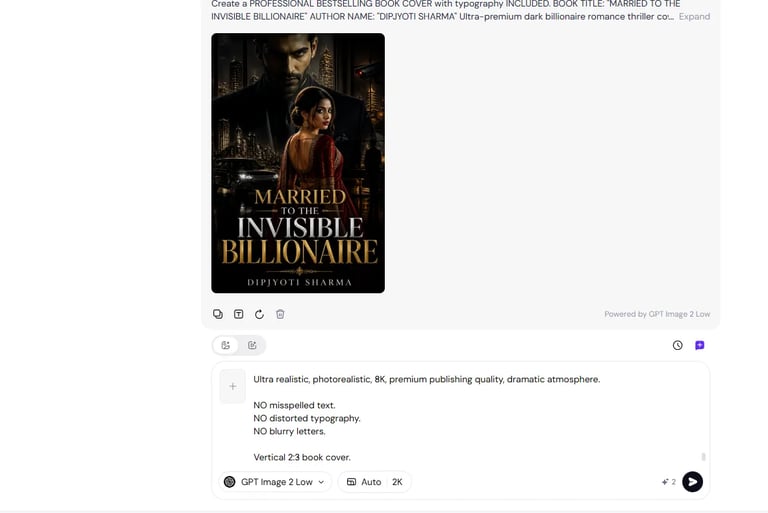
Title: Married to the Invisible Billionaire
Author: Dipjyoti Sharma
Testing title and author text generation inside Sider AI.
Here’s my honest verdict:
The visual atmosphere remained strong.
The mood remained cinematic.
Composition?
Still good.
Typography accuracy?
Less reliable.
But I want to be fair.
This isn’t uniquely a Sider issue.
Most AI image tools still struggle with:
clean typography
accurate spelling
professional text placement
My practical recommendation remains the same:
Generate strong artwork inside AI.
Then refine typography later using Canva, Photoshop, Photopea, or your preferred editor.
That workflow is still safer for professional publishing work.
One Honest Frustration I Had
I think balanced criticism improves trust, so here’s one real frustration.
Sometimes Sider’s strength — having many tools together — can also feel slightly overwhelming.
There are multiple capabilities packed into the platform.
That’s useful.
But newer users may need time to discover:
Which tools actually fit their workflow?
That’s not necessarily a flaw.
It’s the reality of all-in-one systems.
Power creates complexity.
Still worth mentioning.
Who I Think Sider AI Is Actually Good For
After testing, I think Sider fits certain users better than others.
Good Fit For:
✔ Bloggers
✔ Content creators
✔ Researchers
✔ Students
✔ AI enthusiasts
✔ Productivity-focused users
✔ People tired of browser tab overload
Less Ideal For:
❌ Users wanting one perfect “replace everything” AI tool
❌ People who prefer extremely specialized single-purpose software
That distinction matters.
Because expectations change reviews.
Would Bloggers and Writers Actually Benefit From Sider?
Short answer:
Probably yes.
Especially if your workflow involves:
AI writing
prompt engineering
research
summarization
content ideation
image experimentation
That’s where Sider felt strongest during my testing.
If you're building a larger AI productivity system rather than relying on a single platform, you may also enjoy my related article:
The Ultimate Guide to AI Tools in 2026 — 50 Best AI Tools for Productivity, Business, and Creators
And if you’re exploring conversational AI experiences beyond productivity tools, I also reviewed:
Character AI Review 2026: Scenes, Voice & Comics
https://simplifiedaihub.com/character-ai-review-2026-scenes-voice-comics
Internal exploration between related AI tools matters because creator workflows rarely depend on one platform alone.
Pros and Cons
Pros
✔ Clean interface
✔ Multiple AI capabilities in one place
✔ Strong workflow convenience
✔ Useful creator productivity setup
✔ Good for research, writing, and experimentation
✔ Reduced tab overload during testing
Cons
✘ New users may need exploration time
✘ Still works best inside hybrid workflows
✘ Typography generation remains imperfect
✘ All-in-one systems can feel feature heavy initially
My Mid-Review Verdict
By this point in testing, my opinion was becoming clearer.
Sider wasn’t impressing me because of one spectacular feature.
It was impressing me because of workflow efficiency.
That sounds less exciting.
But for creators?
Efficiency matters.
Sometimes more than raw model hype.
Final Verdict: Is Sider AI Worth It in 2026?
After spending real time testing Sider inside an actual creator workflow, my opinion became surprisingly straightforward.
Yes — Sider AI is worth testing in 2026.
But probably not for the reason you think.
It didn’t completely replace ChatGPT for me.
It didn’t suddenly eliminate every tool in my stack.
And it didn’t magically transform productivity overnight.
What it did do was simpler:
It reduced workflow friction.
And honestly?
That matters more than I expected.
My Honest Rating
Here’s my final score after testing Sider across image generation, writing, productivity, and creator workflow tasks.
The strongest category for me was workflow efficiency.
Not because Sider has one unbeatable feature.
Because it helps reduce unnecessary tool switching.
Is Sider AI Better Than Using Separate AI Tools?
This is one of the most important questions.
And the honest answer is:
It depends on how you work.
If you love specialized software for every task, you may still prefer separate systems.
Example:
dedicated writing tool
dedicated image platform
dedicated research workflow
That approach still works.
But if you're searching for:
best AI sidebar for Chrome 2026
or
AI productivity tool for content creators
then Sider becomes much more interesting.
Because convenience becomes part of the value proposition.
Can Sider AI Replace ChatGPT?
Short answer:
No. Not completely.
At least not in my workflow.
I still used ChatGPT heavily for:
prompt engineering
deeper brainstorming
structured thinking
workflow planning
But Sider worked surprisingly well as a complementary layer.
My real testing setup looked like this:
ChatGPT → Prompt Building → Sider Testing → Refinement
That hybrid workflow felt strong.
And honestly, that’s how many creators operate in 2026.
Very few serious users rely on one AI system exclusively anymore.
Is Sider AI Good for Bloggers and Content Creators?
This is probably the audience I would recommend it to first.
If your daily workflow includes:
✔ blog writing
✔ AI prompting
✔ research
✔ content planning
✔ summarization
✔ image generation experiments
then Sider becomes genuinely useful.
Especially if you’re tired of browser tab overload.
If you’re building a smarter AI creator workflow, you might also find value in my article:
Prompt Engineering Master Guide 2026 — How to Write Powerful AI Prompts
https://simplifiedaihub.com/prompt-engineering-master-guide-2026-how-to-write-powerful-ai-prompts
Because stronger prompts still improve almost every AI tool you use.
Frequently Asked Questions About Sider AI
Is Sider AI worth it for bloggers in 2026?
If you frequently switch between AI writing tools, browser research, image generators, and summarizers, Sider can reduce workflow complexity significantly.
Bloggers and creators using multiple AI systems daily may benefit the most.
What is Sider AI mainly used for?
Sider AI combines:
AI chat
writing assistance
summarization
productivity tools
research support
image generation
browser workflow features
Its biggest strength is centralizing tasks.
Can Sider AI replace multiple AI tools?
Partially.
In my testing, Sider reduced tool switching.
But I still maintained a hybrid workflow.
Most creators probably will too.
Is Sider AI good for content creators?
Yes.
Especially for:
bloggers
YouTubers
marketers
researchers
students
productivity enthusiasts
Anyone working across multiple AI tasks may find it useful.
Does Sider AI include an image generator?
Yes.
I tested it using a cinematic book cover creation workflow.
The visual atmosphere and composition impressed me more than expected, though typography still needed refinement.
Is Sider AI free or paid?
Sider offers different usage models and plans depending on features, access levels, and AI capabilities.
Check current pricing directly on the platform because plans may change over time.
What is the best use case for Sider AI?
In my experience?
Workflow reduction.
That became the recurring theme throughout my testing.
Additional FAQ: Low Competition Search Questions
How to use Sider AI for productivity?
Start by using Sider for tasks you already do repeatedly:
webpage summaries
content drafts
prompt testing
quick research
image experimentation
That’s where productivity gains become easiest to notice.
Is Sider AI good for writers and bloggers?
Yes — particularly writers who already use multiple AI tools.
The platform fits content-heavy workflows well.
What is the best AI sidebar tool for content creation?
That depends on your priorities.
If you value:
centralized workflows
browser convenience
multi-tool integration
Sider becomes a strong candidate.
Can Sider AI improve creator workflow efficiency?
In my testing?
Yes.
Not through revolutionary intelligence.
Through reducing interruptions.
That distinction matters.
My Final Recommendation
If someone asked me:
“Should I try Sider AI?”
My answer would be:
Yes — especially if your workflow already feels fragmented.
Not because Sider is perfect.
Not because it replaces everything.
Because it can simplify parts of modern AI work.
And sometimes simplicity creates surprisingly meaningful productivity gains.
If you enjoy exploring AI ecosystems, creator workflows, and practical productivity tools, you may also enjoy these related reads on SimplifiedAIHub:
Ultimate Guide to AI Tools 2026
https://simplifiedaihub.com/the-ultimate-guide-to-ai-tools-in-2026-50-best-ai-tools-for-productivity-business-and-creators
Character AI Review 2026
https://simplifiedaihub.com/character-ai-review-2026-scenes-voice-comics
Prompt Engineering Master Guide 2026
https://simplifiedaihub.com/prompt-engineering-master-guide-2026-how-to-write-powerful-ai-prompts
Final Thought
Did Sider AI literally cut my workload in half?
Not every single day.
But during creative testing?
Honestly… close enough that I noticed.
And for an AI productivity tool?
That’s probably the strongest compliment I can give.