The 5-Step AI Audit I Use to Automate My Small Business (2026 Complete Guide)
I use this 5-step AI audit to automate tasks, save time, and build efficient workflows using AI tools like OpenAI, Make.com, and Gemini.
AUTOMATION
DIPJYOTI SHARMA
3/21/20264 min read


The 5-Step AI Audit I Use to Automate My Small Business (2026 Complete Guide)
Table of Contents
Why I Was Wasting Time Before Using AI
What an AI Audit Means in My Workflow
Step 1: I Track Every Task
Step 2: I Score Tasks
Step 3: I Match Tools Strategically
Step 4: I Build One Automation
Step 5: I Measure Real Results
My Real AI Workflow (With Tools)
Results I Achieved
Mistakes I Made
Limitations You Should Know
Conclusion
FAQs
Author Bio
1. Why I Was Wasting Time Before Using AI
When I first started using AI tools, I thought productivity meant using more tools.
So I tried everything—writing tools, automation tools, research tools.
But instead of saving time, I became overwhelmed.
I was:
Switching between tools constantly
Doing the same tasks manually
Getting inconsistent results
That’s when I realized something important:
👉 AI doesn’t fix chaos—it amplifies it.
What I needed was not more tools, but a clear system.
That’s when I started using this 5-step AI audit.
2. What an AI Audit Means in My Workflow
For me, an AI audit is simple:
👉 A method to identify repetitive work and replace it with automation.
I use this whenever:
My workload increases
I feel stuck
My workflow becomes inefficient
Instead of guessing, I follow a structured process.
3. Step 1: I Track Every Task
I track everything I do for 1–2 days.
My real tasks:
Writing blog posts
Researching topics
Replying to emails
Posting content
👉 This step helped me discover hidden time waste.
4. Step 2: I Score Tasks
I categorize tasks based on automation potential:
Task TypeExampleScoreRepetitiveEmails, posting5CreativeWriting3StrategicPlanning1
👉 I always start with high-score tasks.
This gives quick results.
5. Step 3: I Match Tools Strategically
Instead of randomly using tools, I assign them based on purpose.
Here’s how I do it:
For writing and prompts → I follow my detailed OpenAI workflow
👉 https://simplifiedaihub.com/openai-full-tutorial-2026-beginner-to-power-user-guideFor automation → I use Make.com to connect systems
👉 https://simplifiedaihub.com/where-can-we-use-makecom-the-complete-guide-to-business-automation-in-2026For research and idea generation → I use Gemini
👉 https://simplifiedaihub.com/gemini-ai-full-tutorial-2026-complete-beginner-to-pro-guide-advanced-features-explained
👉 These tools work together as a system—not individually.
6. Step 4: I Build One Automation
I follow a strict rule:
👉 One problem = One automation
Example:
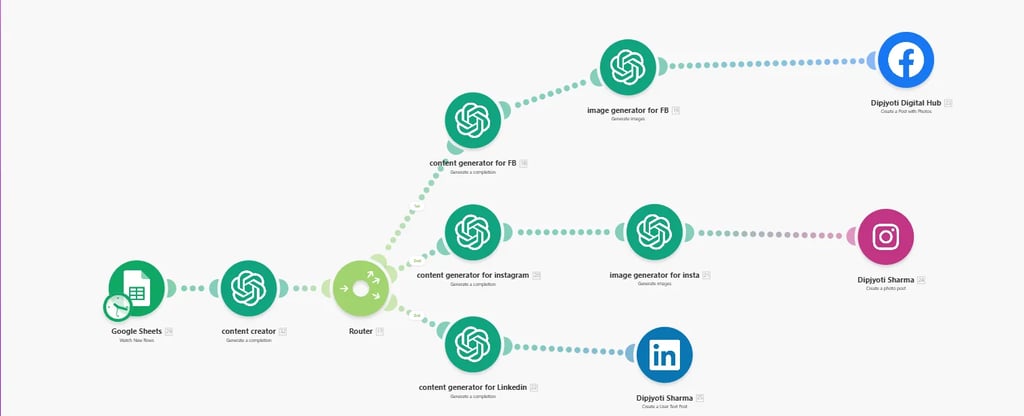
Blog published → auto-share to social media
Email received → AI drafts reply
This is where I started seeing real results.
7. Step 5: I Measure Real Results
I track:
Time saved
Tasks automated
Output increased
My real improvement:
Email time reduced by ~60%
Content workflow became consistent
👉 This is real productivity—not just “feeling busy.”
8. My Real AI Workflow (With Tools)
Here’s how my system works together:
🔹 Content Creation
I use OpenAI to:
Generate outlines
Write drafts
Improve content
🔹 Automation
I use Make.com to:
Connect tools
Automate posting
Reduce manual work
🔹 Research
I use Gemini to:
Analyze topics
Generate ideas
Speed up research
👉 This combination allows me to run a lean business workflow.
9. Results I Achieved
After applying this system:
I reduced repetitive work
I improved consistency
I saved hours every week
Most importantly:
👉 I built a system that scales.
10. Mistakes I Made
Using too many tools
Automating complex workflows first
Not measuring results
Trusting AI blindly
👉 Avoid these mistakes—you’ll progress faster.
11. Limitations You Should Know
AI is powerful—but not perfect.
From my experience:
It still needs human review
It cannot replace decision-making
It works best with clear instructions
👉 I always use AI as an assistant—not a replacement.
12. Conclusion
This 5-step AI audit changed how I work.
It helped me:
Save time
Reduce manual work
Build scalable workflows
👉 Start with one task. That’s how I started.
13. FAQs
1. What is an AI audit?
A system to identify and automate repetitive tasks using AI tools.
2. Which tools should I start with?
OpenAI, Make.com, and Gemini are great starting points.
3. Do I need coding skills?
No. I use no-code tools.
4. How fast can I see results?
In my experience, within 1–2 weeks.
5. Is this beginner-friendly?
Yes. I built this system based on my own experience.
About the Author
Hi, I’m the creator of Simplified AI Hub, where I simplify complex AI tools into practical workflows for beginners and small business owners.
I regularly test AI tools like OpenAI, Make.com, and Gemini to build real-world systems that save time and improve productivity.
Through this blog, I share:
Step-by-step AI tutorials
Automation workflows
Practical strategies that actually work
👉 My goal is simple: help you use AI effectively—not just understand it.
📘 Want a Complete Online Income Blueprint?
If you’re serious about turning AI skills into real online income — not just learning tools — you need a structured system.
I explain the complete roadmap, including freelancing, digital products, blogging, and scalable income strategies, in my book:
This book is designed as a step-by-step implementation guide so you don’t need to jump between YouTube tutorials or random courses.
🔗 Get the book here:
The Ultimate Online Income System