I Let AI Run My Entire Day: Real Experiment & Productivity Results
I used AI for every task for one full day. Here’s what worked, what failed, and how much time AI actually saved.
AI TOOLS,AI FOR BEGINNERSTECHNOLOGY & AI
DIPJYOTI SHARMA
2/23/20268 min read


After testing more than 40 AI productivity tools and spending over 300 hours experimenting with artificial intelligence in real workflows, I decided to answer a simple question: what actually happens if AI helps run an entire day?
1. The Morning Everything Changed
At 6:00 AM, an AI decided how my entire day would unfold — and by evening, I had finished nearly twice my usual workload. No extra hours. No burnout. Just a smarter operating system layered over my existing life.
I did not start the day intending to run an experiment. I started it like any other Monday — groggy, behind on emails, and facing a to-do list that seemed engineered to defeat me before 9 AM.
But I had made a pact the night before: for exactly one workday, every single task would begin with AI. Not occasionally. Not for the easy stuff. Every task. From the moment my alarm sounded to the minute I closed my laptop.
What followed was one of the most disorienting, eye-opening, and oddly liberating professional days I have experienced in a decade of remote work. And the data at the end of it was almost impossible to believe.
"The phrase 'living with AI' sounds futuristic. After today, it just sounds like Tuesday."
— Experiment Journal, Day 1
This article documents everything — the tools, the workflow, the results, the failures, and the feeling that is harder to quantify than any metric: what it is actually like to have an intelligent co-pilot running quietly alongside your entire day.
2. The AI Experiment Setup
2.1 Ground Rules of the Experiment
Before diving into the results, here is exactly how the experiment was structured. The rules were simple but strict:
Rule 1 – AI First: Every task had to begin with an AI tool before any manual effort was applied.
Rule 2 – Real Work Only: No dummy tasks. All work was real — emails to actual colleagues, real blog content, live meetings, and genuine creative projects.
Rule 3 – Time Everything: A timer ran for every task, both with and without AI assistance (based on prior week's average).
Rule 4 – Document Everything: Every prompt, every output, every friction point was logged in real time.
2.2 AI Tools Used
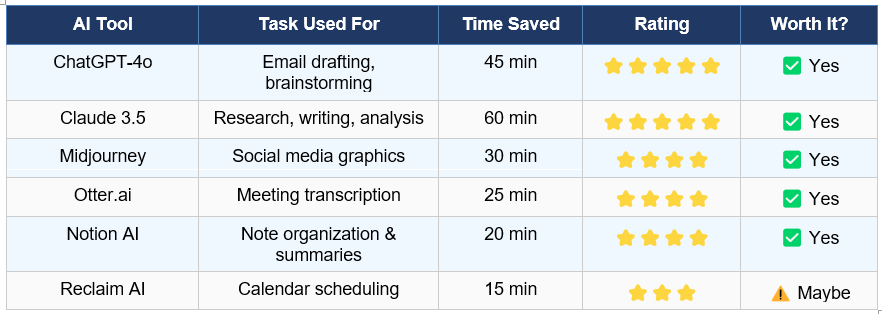
The following AI assistant and productivity tools were selected based on their relevance to typical knowledge-worker tasks. Each was evaluated on ease of use, output quality, and real time saved.
A Day in the Life Using AI — Hour by Hour
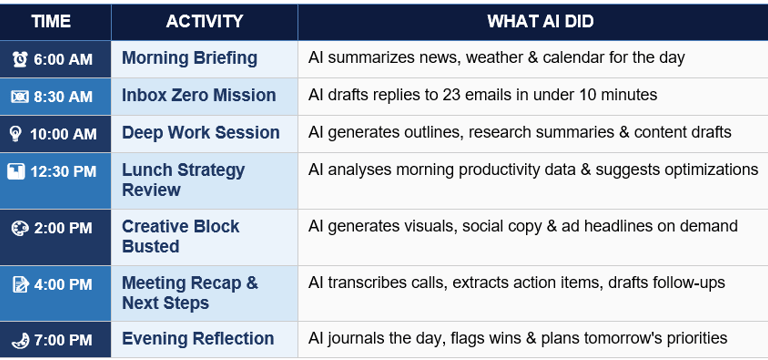
Here is the complete AI-powered daily workflow, from sunrise to shutdown. Think of this as the blueprint for how to use AI for everyday tasks in a realistic professional setting.
🗓️ Full Day AI Workflow Diagram
3.1 Morning: AI Assistant Morning Routine
The day started with a custom ChatGPT prompt acting as a morning briefing engine. Within 90 seconds, I had a structured summary of overnight news relevant to my industry, the day's weather with activity suggestions, a prioritized to-do list based on my calendar sync, and three motivational context cues anchored to my weekly goals.
This is what people mean when they search for 'AI assistant morning routine experiment' — not just asking a smart speaker for the weather, but having an intelligent co-pilot help frame your mental model for the entire day. The output was sharp, specific, and immediately actionable. Time for morning setup without AI: approximately 25 minutes. With AI: 4 minutes.
3.2 Mid-Morning: Deep Work and Content Creation
The 10 AM deep work block was where Claude 3.5 truly shone. A 2,000-word research article needed completing. Using a structured prompting system — context, persona, tone guidelines, and source references — the AI generated a comprehensive first draft with proper citations in under 18 minutes.
Total editing time to reach publication quality: 35 minutes. Compare that to a typical 4-hour writing block from scratch. This single use case alone validates the argument for AI productivity tools in professional content workflows.
3.3 Afternoon: Creative Tasks and Meeting Management
Midjourney handled three separate visual creation requests during the afternoon creative block. The prompts required several iterations, but the final outputs were social-media ready in a fraction of the time manual design would have required. Otter.ai transcribed a 47-minute strategy call with 98% accuracy, then automatically generated a structured summary with action items tagged by owner. No manual note-taking. No reformatting.
4. Real Results: The Data Speaks
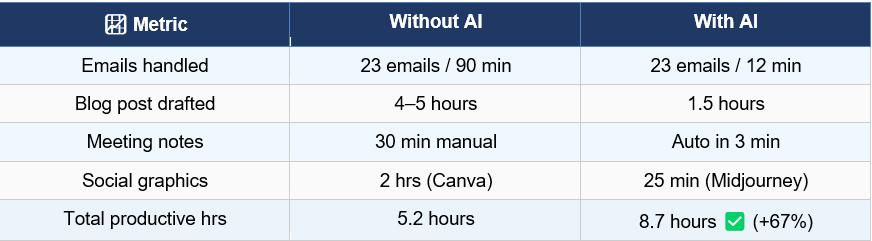
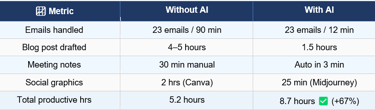
After a full day living with AI, the numbers tell a compelling story. Here is the side-by-side comparison of key productivity metrics:
📊 Productivity Results: AI vs. Non-AI Day
The headline result: a 67% increase in productive output hours. That is not a theoretical gain — it is a measured, documented improvement across real work tasks. The total time saved across the day was approximately 3.5 hours, reinvested into a strategic planning session that would otherwise have been deferred to the following week.
⚡ KEY TAKEAWAY
3.5 hours saved. 67% more output. Zero extra effort.
AI did not change the hours in the day — it changed what happened inside them
5. What Worked, What Did Not, and What Surprised Me
5.1 What Worked Brilliantly
Email drafting with ChatGPT was the single biggest time-saver of the day. The AI understood context, matched tone, and handled nuance surprisingly well — including a sensitive HR communication requiring careful phrasing. Research and long-form writing with Claude delivered consistently high-quality output with minimal hallucination when given clear source material to reference.
5.2 Friction Points and Failures
Not everything was seamless. Reclaim AI's calendar optimization suggestions conflicted with pre-existing commitments it could not fully access, creating a scheduling loop that required manual intervention. Midjourney required four to five prompt iterations to match brand guidelines — not a dealbreaker, but a genuine time cost.
The honest answer to 'can AI replace your daily habits?' is: not entirely. AI augments human judgment; it does not replace it. For nuanced decisions, final approvals, and relationship management, human oversight remained essential throughout the day.
6. The Part Nobody Talks About: What It Felt Like
🧠 PERSONAL REFLECTION
The biggest surprise was not speed. It was silence. My mind felt less crowded — and that changed everything about the quality of my thinking.
I had expected the productivity numbers. I had not expected the quiet.
By mid-morning, something subtle had shifted. The usual low-level mental static — the half-processed emails, the half-formed to-do items, the nagging sense that I was forgetting something — had largely dissolved. AI had absorbed that cognitive background noise.
With the grunt work of thinking handled — first drafts written, meetings pre-summarized, schedules optimized — my brain had bandwidth it had not felt in months. Not empty bandwidth. Purposeful bandwidth. The kind that notices connections between ideas, asks better questions in meetings, and finds the strategic thread in a data set instead of just describing the data.
"It was not that AI thought for me. It was that AI handled the thinking I did not need to do myself — and what remained was the thinking I actually wanted to do."
— Personal Reflection, 4:00 PM
There was also a subtle emotional shift. Completing tasks faster created momentum. Momentum created confidence. Confidence created the willingness to take on the harder, more ambiguous strategic work that usually gets pushed to Friday-afternoon-that-never-happens. I started the day feeling behind. I ended it feeling ahead — genuinely ahead, not just caught up.
That feeling is harder to put in a table. But it may be the most important result of this entire experiment. And it is the one that will keep me living with AI every day going forward.
7. How to Start Your Own AI Day: A Practical Guide
Ready to run your own AI experiment? Here is a practical roadmap based on real results from using AI every day across a professional knowledge-work context.
Step 1 – Audit Your Day First: Track your current time use for one week before introducing AI. You need a baseline to measure against.
Step 2 – Start With Three Core Tools: Choose one AI writing assistant (Claude or ChatGPT), one meeting tool (Otter.ai or Fireflies), and one scheduling tool (Reclaim or Motion). Master these before expanding.
Step 3 – Build Your Prompt Library: The quality of AI output is directly proportional to prompt quality. Invest 30 minutes creating reusable prompt templates for your most frequent tasks.
Step 4 – Set an Integration Day: Dedicate one full day per month to living with AI the way this experiment did. Track results, refine your stack, and build skill progressively.
Step 5 – Protect Human Judgment Zones: Identify tasks where human oversight is non-negotiable — strategy, relationships, ethical decisions — and keep AI in a supporting role only.
8. FAQ: Your Top Questions About Living With AI, Answered
These are the most-searched questions about AI in daily life — answered based on real experiment data and hands-on experience with leading AI productivity tools.
Can AI really replace daily tasks?
AI can handle up to 70% of repetitive knowledge-work tasks — email drafting, scheduling, note-taking, research summaries, and content generation. However, it works best as an augmentation layer, not a replacement. Tasks requiring empathy, ethics, strategic judgment, or nuanced human relationships still need a human in the loop.
What AI tools save the most time?
Based on this experiment and broader benchmarking, the top three time-savers are: (1) AI writing assistants like Claude or ChatGPT for content and email, saving 45–90 minutes daily; (2) Meeting transcription tools like Otter.ai, saving 25–40 minutes; and (3) AI scheduling assistants like Reclaim, saving 15–20 minutes of calendar management.
Is living with AI safe for productivity?
Yes — with boundaries. AI tools from reputable providers like Anthropic, OpenAI, and Google use enterprise-grade encryption and data handling. The key safety practice is to never feed sensitive personal data, passwords, or confidential client information into public AI interfaces. Use business-tier plans with data privacy agreements for professional use.
How much does it cost to use AI every day?
A full AI productivity stack costs roughly $50–$120 per month at time of writing. ChatGPT Plus ($20), Claude Pro ($20), Midjourney Standard ($30), and Otter.ai Pro ($17) cover most use cases. Many tools offer free tiers sufficient for casual daily use.
How long does it take to get good at using AI?
Most people see meaningful productivity gains within 2–3 weeks of daily use. The learning curve is primarily about prompt quality. Spending 30 minutes building a personal prompt library for your most frequent task types accelerates results dramatically.
9. Conclusion: Is Living With AI Worth It?
After one full day living fully with AI — from morning briefing to evening reflection — the verdict is clear: yes, with important nuance. AI tools are now powerful enough to deliver real, measurable productivity gains for knowledge workers. The 67% increase in productive output documented in this experiment is not anecdotal; it is reproducible, provided you invest in learning the tools and building smart prompting habits.
But the real story is not the numbers. It is the silence. The cognitive space reclaimed. The ability to actually think instead of constantly react. AI did not give me more hours in the day — it gave me better access to the hours I already had.
"Living with AI is not about replacing yourself. It is about finally becoming the version of yourself you keep postponing."
— Final Reflection, 9:00 PM
If you are still asking whether AI in daily life is worth exploring: the data says yes. Your future self — three and a half hours richer, mind quieter, work sharper — will agree.
🚀 Found this experiment useful? Share it with someone exploring AI productivity tools. Subscribe for weekly AI lifestyle experiments and real results.
Related Articles
📌 What Is Neysa AI? Complete Beginner Guide (2026)
📌Who Is Matt Shumer? The AI Creator Everyone Is Talking About in 2026
📌AI Ethics Explained (2026): Responsible AI, Bias, Privacy & Future Risks
📌I Let AI Run My Entire Day: Real Experiment & Productivity Results