Miro AI Diagram Generator Review 2026: Features & Pricing
Discover how Miro AI Diagram Generator creates flowcharts, mind maps, and workflows in seconds. Read our hands-on review, pricing, pros, and cons.
AI TOOLS
DIPJYOTI SHARMA
6/19/202610 min read
Miro AI Diagram Generator Review 2026: Create Flowcharts, Mind Maps & Process Diagrams in Seconds
Table of Contents
Introduction
What Is Miro AI Diagram Generator?
Why AI Diagram Tools Are Growing So Fast
My Hands-On Testing Experience
Key Features of Miro AI
Creating Flowcharts with Miro AI
Creating Mind Maps with Miro AI
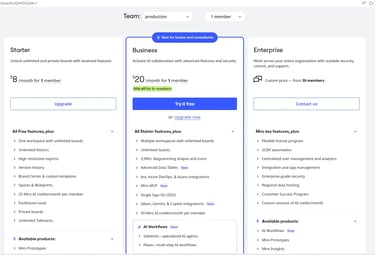
Miro AI Pricing
Pros and Cons
Miro AI vs Competitors
Who Should Use Miro AI?
Final Verdict
FAQs
Introduction
Creating professional diagrams used to be a time-consuming task. Whether you needed a flowchart, mind map, project roadmap, or business process diagram, you often had to manually add shapes, connect boxes, and organize everything yourself.
Today, artificial intelligence is changing that process.
AI diagram generators can transform a simple text prompt into a structured visual diagram within seconds. This saves time, improves productivity, and helps teams communicate ideas more clearly.
One of the most popular tools in this category is Miro AI Diagram Generator.
Miro is already known as a leading visual collaboration platform used by businesses, educators, marketers, and project managers worldwide. In recent years, the company has added AI-powered features that can automatically create diagrams, workflows, mind maps, and planning boards.
To see whether Miro AI lives up to the hype, I tested it myself using several real-world scenarios. I created content marketing workflows, SEO planning diagrams, business process maps, and EEAT mind maps to evaluate how well the AI performs.
In this review, I will share my experience, explain the features, discuss pricing, compare Miro AI with competitors, and help you decide whether it is worth using in 2026.
What Is Miro AI Diagram Generator?
Miro AI Diagram Generator is an AI-powered tool that converts natural language prompts into visual diagrams.
Instead of spending time manually building diagrams, users simply describe what they need.
For example:
Create a content marketing workflow from keyword research to publishing.
or
Create a mind map explaining Google's EEAT framework.
The AI then generates a visual structure that can be edited, expanded, and shared with others.
Miro AI can create:
Flowcharts
Mind Maps
Process Diagrams
Organizational Charts
User Journey Maps
Project Roadmaps
Brainstorming Boards
Strategy Maps
Team Workflows
This makes it useful for professionals across many industries.
Why AI Diagram Tools Are Growing So Fast
Businesses create more information than ever before.
Teams need to explain:
Workflows
Business processes
Product development plans
Marketing strategies
Customer journeys
Project timelines
Traditional diagram software works well, but it often requires a lot of manual effort.
AI diagram generators solve this problem by creating a first draft automatically.
Instead of spending 30 minutes building a diagram from scratch, users can generate one in a few seconds and then make small adjustments.
This is similar to how AI writing tools help create first drafts of articles.
If you have read our reviews of tools like:
you already know how AI is helping people work faster. Miro AI applies the same concept to visual communication.
My Hands-On Testing Experience
I did not want to rely only on Miro's marketing materials.
Instead, I tested the platform using practical tasks that many people perform every day.
My goal was simple:
Can Miro AI create useful diagrams that people would actually use in real work?
To find out, I created several diagrams using different prompts.
Test 1: Blog Content Workflow
The first test focused on content creation.
I entered the following prompt:
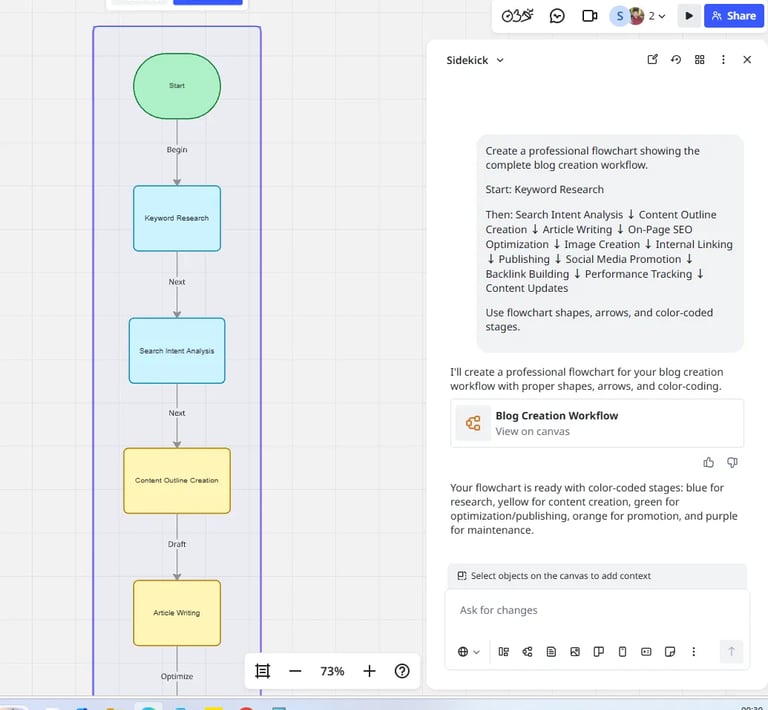
Create a complete blog content workflow from keyword research to content updates.
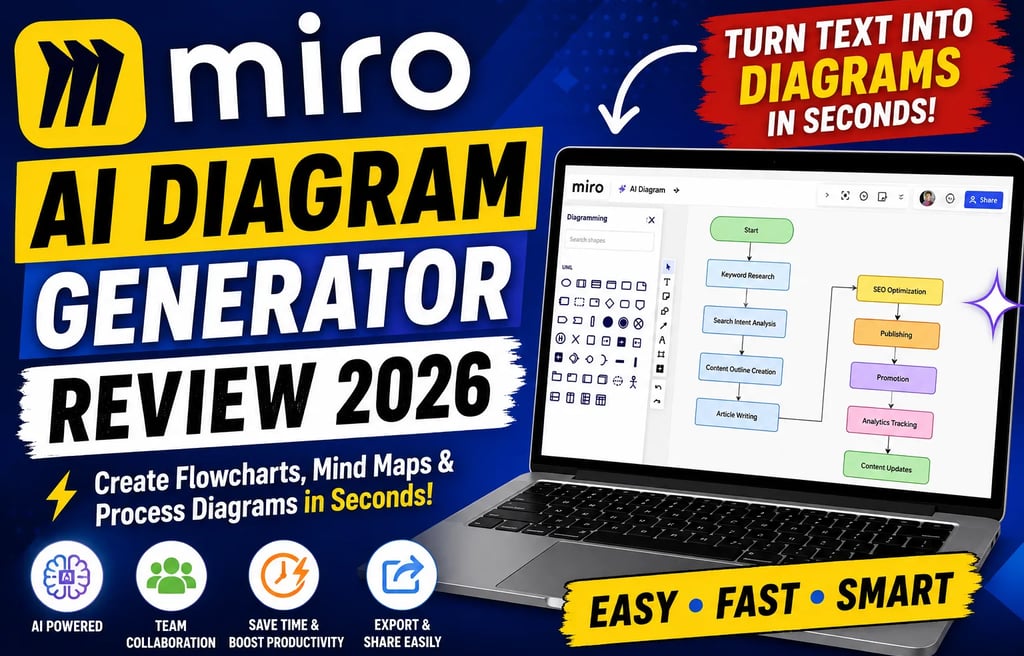
Within seconds, Miro AI generated a structured flowchart.
The workflow included:
Keyword Research
Search Intent Analysis
Content Outline
Article Writing
SEO Optimization
Image Creation
Publishing
Promotion
Analytics
Content Updates
My Experience
The generated workflow looked professional and required only minor edits.
The AI understood the relationship between each step and placed them in a logical sequence.
For marketers, bloggers, and SEO professionals, this feature alone can save a significant amount of planning time.
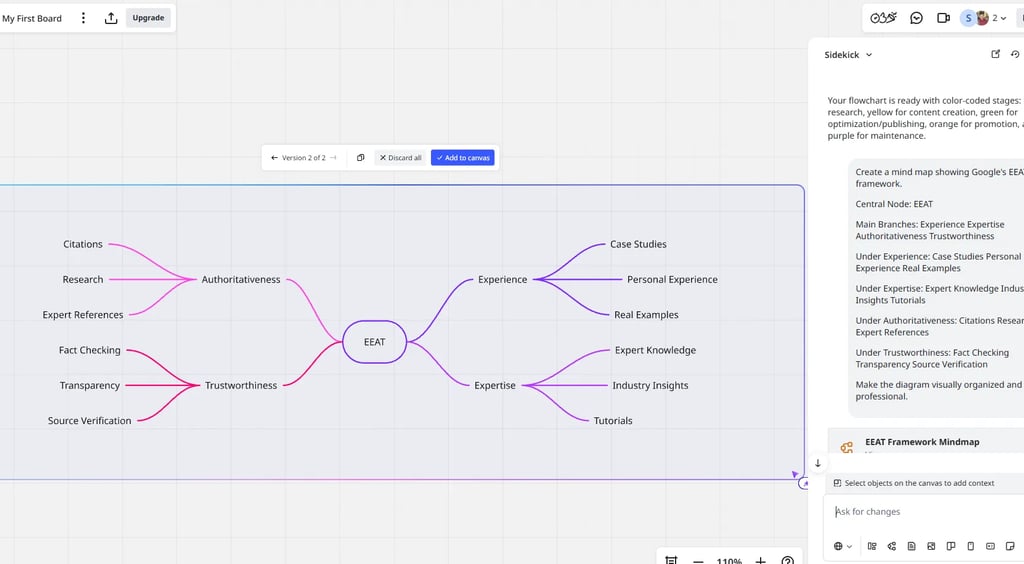
Test 2: EEAT Mind Map
Next, I tested whether Miro AI could organize more conceptual information.
I used this prompt:
Create a mind map showing Google's EEAT framework.
The result was impressive.
The AI created a central EEAT node and automatically added the four main components:
Experience
Expertise
Authoritativeness
Trustworthiness
Each section included supporting branches and related concepts.
My Experience
This was one of the strongest results from my testing.
For bloggers, SEO professionals, consultants, and educators, Miro AI can quickly transform complex ideas into visual learning tools.
Key Features of Miro AI Diagram Generator
1. AI Flowchart Generator
Flowcharts are among the most commonly used business diagrams.
Miro AI can generate flowcharts for:
Content Marketing
Customer Support
Sales Processes
HR Workflows
Product Development
Project Management
The AI automatically creates logical connections between steps and presents them in an easy-to-understand format.
2. AI Mind Map Generator
Mind maps help organize information visually.
Popular uses include:
Brainstorming
Topic Clusters
Study Notes
SEO Planning
Business Strategy
Instead of manually creating branches, Miro AI generates them automatically based on your prompt.
3. Team Collaboration
One of Miro's biggest advantages is collaboration.
Unlike many standalone AI diagram tools, Miro was designed for teams.
Users can:
Share diagrams
Leave comments
Collaborate in real time
Present ideas visually
Edit together from different locations
This makes Miro especially useful for remote teams and organizations.
Miro AI Pricing: Is It Worth the Cost?
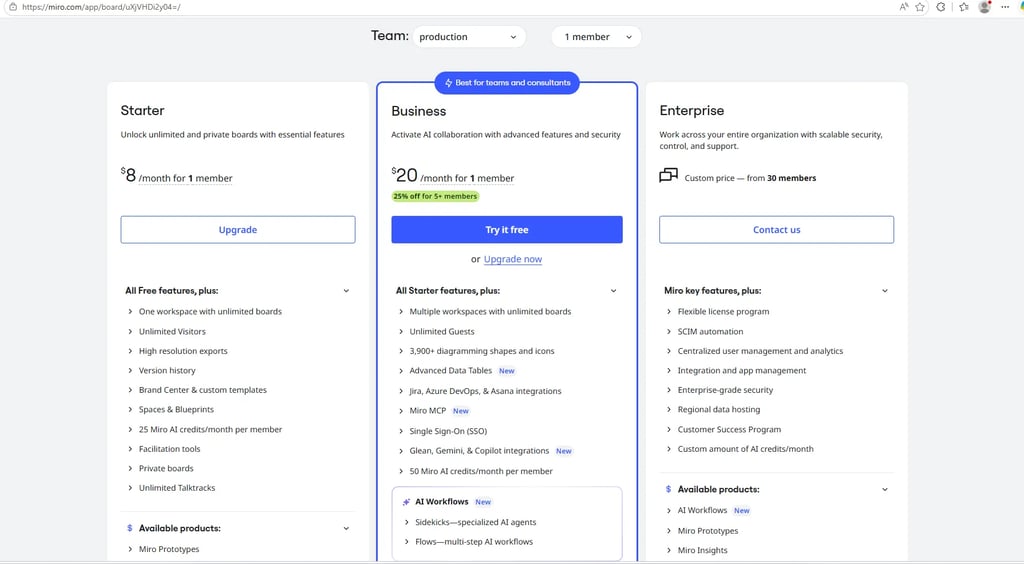
Pricing is one of the first things people consider before investing in a new AI tool. During my testing, I explored Miro's pricing plans to understand what users actually get for their money.
At the time of testing, Miro offered three primary paid options.
My Recommendation
If you only need occasional diagrams, the free plan is a good starting point.
However, if you regularly create workflows, mind maps, project plans, or team documentation, the Business plan offers the best value because it unlocks more advanced AI capabilities and collaboration features.
For agencies, remote teams, and consultants, the productivity gains can easily justify the monthly cost.
Miro AI Diagram Generator Interface
One thing I liked during testing was how easy the interface is to understand.
Many diagram tools overwhelm users with hundreds of buttons and complicated menus. Miro takes a more visual approach.
The platform is designed so that beginners can start creating diagrams quickly without spending hours learning the software.
This is important because many users want results immediately rather than spending days learning a complex system.
Miro Sidekick AI: Turning Ideas Into Diagrams
One of the most interesting features I tested was Miro Sidekick AI.
Instead of manually creating a diagram, users can simply describe what they need.
For example:
Create a customer onboarding workflow for a SaaS business.
or
Create a project roadmap for launching a mobile app.
The AI then creates a structured diagram automatically.
What I Learned During Testing
The quality of the output depends heavily on the quality of the prompt.
A vague prompt like:
Create a marketing diagram.
produces a basic result.
A detailed prompt like:
Create a content marketing workflow including keyword research, content planning, writing, SEO optimization, publishing, promotion, backlink building, analytics tracking, and content updates.
produces a much more useful diagram.
This is true for most AI tools, but Miro AI responds particularly well to detailed instructions.
Best Prompts for Miro AI Diagram Generator
During testing, I discovered several prompt styles that consistently produced strong results.
SEO Workflow Prompt
Create a complete SEO workflow showing keyword research, search intent analysis, content planning, article creation, on-page SEO, internal linking, link building, performance tracking, and content updates.
Content Marketing Prompt
Create a content marketing strategy flowchart showing topic research, content planning, writing, editing, publishing, social media promotion, email marketing, and analytics.
Business Process Prompt
Create a customer onboarding workflow from lead generation to customer retention.
Product Roadmap Prompt
Create a product development roadmap including planning, design, development, testing, launch, feedback collection, and improvements.
Project Management Prompt
Create a project management workflow showing project initiation, planning, execution, monitoring, reporting, and project closure.
The more detailed your prompt is, the better your diagram will be.
Miro AI vs EdrawMax AI
Many readers compare Miro AI with EdrawMax AI because both tools can generate diagrams using artificial intelligence.
However, they focus on slightly different audiences.
Choose Miro AI If:
You work with teams
You need collaboration features
You create business workflows
You run workshops or brainstorming sessions
You want visual planning tools
Choose EdrawMax AI If:
You need advanced engineering diagrams
You work with technical documentation
You require specialized diagram templates
For most bloggers, marketers, agencies, startups, and business teams, Miro AI is usually the better choice.
Miro AI vs Lucidchart
Lucidchart is another popular diagramming platform.
While both tools are capable, there are important differences.
Miro feels more flexible and creative, while Lucidchart focuses more heavily on structured business diagrams.
If your work involves brainstorming, planning, and collaboration, Miro AI offers a better overall experience.
Pros and Cons
Every software tool has strengths and weaknesses. Here is my honest assessment after testing Miro AI.
Pros
Extremely Easy to Use
Even beginners can create useful diagrams within minutes.
Fast AI Generation
Most diagrams are generated in under 30 seconds.
Excellent Collaboration Features
Teams can work together in real time.
Large Template Library
Miro provides templates for many industries and use cases.
Strong Visual Presentation
Generated diagrams look professional and presentation-ready.
Great for Business Users
Marketing teams, project managers, educators, and consultants will find many practical uses.
Cons
AI Outputs Sometimes Need Editing
Generated diagrams are usually good, but not always perfect.
Limited AI Credits on Lower Plans
Heavy users may need a paid subscription.
Technical Diagrams Could Be Better
Engineering-focused users may prefer EdrawMax AI.
Large Projects Can Become Complex
Very large diagrams may require some manual organization.
Who Should Use Miro AI?
After testing the platform extensively, I believe Miro AI is ideal for:
Bloggers
Create content workflows, topic clusters, and editorial processes.
SEO Professionals
Visualize SEO campaigns, keyword strategies, and content plans.
Marketing Teams
Map customer journeys and marketing funnels.
Product Managers
Create roadmaps and product planning diagrams.
Educators
Build learning frameworks and visual study materials.
Consultants
Present business strategies and workflows clearly.
Remote Teams
Collaborate visually from anywhere in the world.
Who Should NOT Use Miro AI?
Miro AI may not be the best option for:
Users who need highly technical engineering diagrams.
People looking for unlimited AI features on a free plan.
Users who rarely create diagrams.
Individuals who do not need collaboration features.
If your work involves visual planning, communication, or process mapping, Miro AI is likely worth exploring.
My Overall Experience After Several Days of Testing
After creating multiple flowcharts, mind maps, business workflows, and content planning diagrams, I came away impressed.
The biggest advantage of Miro AI is not simply the diagram generation itself.
The real value comes from combining:
AI-powered diagram creation
Team collaboration
Whiteboards
Templates
Planning tools
Presentation capabilities
This combination makes Miro much more than a simple AI diagram generator.
It becomes a complete visual collaboration platform that can help teams organize ideas, communicate clearly, and work more efficiently.
Final Verdict: Is Miro AI Worth It in 2026?
After spending several days testing Miro AI Diagram Generator, creating multiple workflows, mind maps, and business process diagrams, I can confidently say that Miro AI is one of the best AI diagram generators available in 2026.
What makes Miro different is that it does more than create diagrams.
Many AI diagram tools focus only on generating flowcharts. Miro combines AI-powered diagram generation with collaboration, brainstorming, project planning, whiteboards, templates, and team communication.
This makes it a complete visual workspace rather than just a diagram creator.
During testing, I found that Miro AI was particularly effective for:
Content planning
SEO strategy mapping
Business workflows
Marketing campaigns
Project management
Team collaboration
Educational content
Brainstorming sessions
The AI generated diagrams quickly, understood prompts well, and produced outputs that required only minor edits.
While it is not perfect and some diagrams may need adjustments, it can save hours of manual work every week.
For professionals who regularly create visual content, workflows, or planning documents, Miro AI can be a valuable productivity tool.
Miro AI Diagram Generator: Quick Rating
Miro AI at a Glance
Key Takeaways
If you only remember five things from this review, remember these:
1. Miro AI Saves Time
Instead of manually creating diagrams, users can generate them in seconds using simple prompts.
2. Great for Teams
Collaboration is where Miro truly shines.
3. Excellent for Content Planning
Bloggers, SEO professionals, and marketers can create visual workflows quickly.
4. Easy for Beginners
No design or technical skills are required.
5. More Than a Diagram Tool
Miro is a complete visual collaboration platform that combines AI, whiteboards, planning, and communication.
Frequently Asked Questions
What is Miro AI Diagram Generator?
Miro AI Diagram Generator is an AI-powered tool that creates flowcharts, mind maps, process diagrams, and visual workflows from text prompts.
Is Miro AI free?
Yes. Miro offers a free plan, although advanced AI features and additional AI credits are available in paid plans.
Can Miro AI create flowcharts automatically?
Yes. Simply describe a process and Miro AI will generate a flowchart automatically.
Can Miro AI generate mind maps?
Yes. Mind map generation is one of the platform's strongest features.
Is Miro AI suitable for beginners?
Absolutely. The interface is user-friendly and requires no technical knowledge.
Can teams collaborate on Miro diagrams?
Yes. Multiple team members can view, edit, comment, and collaborate in real time.
Does Miro AI require coding skills?
No. Everything is done through prompts and visual editing.
Is Miro AI better than EdrawMax AI?
For collaboration and brainstorming, Miro AI is generally better. For highly technical diagrams, EdrawMax AI may have an advantage.
Can I export diagrams created in Miro AI?
Yes. Miro supports multiple export options depending on your plan.
Does Miro AI work on mobile devices?
Yes. Miro offers mobile applications and browser-based access.
Can Miro AI create project roadmaps?
Yes. Roadmaps are one of the most useful diagram types supported by the platform.
Is Miro AI good for SEO planning?
Yes. SEO professionals can create keyword maps, content workflows, topic clusters, and strategy diagrams.
Can educators use Miro AI?
Yes. Teachers and students can create learning maps, study guides, and educational diagrams.
Does Miro AI support remote teams?
Yes. Remote collaboration is one of the platform's core strengths.
How accurate are AI-generated diagrams?
Most diagrams are accurate and useful, but reviewing and refining them before final use is recommended.
Additional FAQs
Can Miro AI create organizational charts?
Yes. Users can generate organizational structures using text prompts.
Can Miro AI create customer journey maps?
Yes. Customer journey mapping is one of its popular business use cases.
Is Miro AI useful for startups?
Yes. Startups can use it for planning, brainstorming, product development, and team collaboration.
Can consultants use Miro AI?
Absolutely. Consultants can create presentations, workflows, strategy maps, and business process diagrams.
Does Miro AI support workshop planning?
Yes. Workshop facilitation is one of Miro's most widely used features.
What industries can benefit from Miro AI?
Marketing, education, consulting, software development, project management, healthcare, finance, and many other industries.
Related AI Tool Reviews
If you enjoy exploring AI productivity tools, check out these guides:
Jenni AI Review 2026: https://simplifiedaihub.com/jenni-ai-review-2026
Siri AI in 2026: https://simplifiedaihub.com/siri-ai-in-2026-features-apple-intelligence-and-future
How to Make and Publish an App for Free Using Lovable AI: https://simplifiedaihub.com/how-to-make-and-publish-an-app-for-free-using-lovable-ai-2026
Character AI Review 2026: https://simplifiedaihub.com/character-ai-review-2026-scenes-voice-comics
MagicSchool AI Review 2026: https://simplifiedaihub.com/magicschool-ai-review-2026
Conclusion
AI is changing how people create, plan, and communicate ideas. Miro AI Diagram Generator is a perfect example of this transformation.
By turning simple text prompts into professional flowcharts, mind maps, workflows, and strategy diagrams, Miro AI helps individuals and teams work faster and more efficiently.
After extensive hands-on testing, I found that Miro AI delivers strong results, especially for content creators, marketers, educators, consultants, project managers, and remote teams.
If your work involves organizing ideas visually, planning projects, documenting processes, or collaborating with others, Miro AI is one of the best AI-powered diagram tools worth considering in 2026.
Final Rating: 4.8/5 ⭐
Recommended For: Bloggers, marketers, project managers, consultants, educators, startups, and remote teams.
Verdict: Highly recommended for anyone looking to create professional diagrams quickly using AI.